
User manual of Genius™ 3 Tympanic Thermometer.
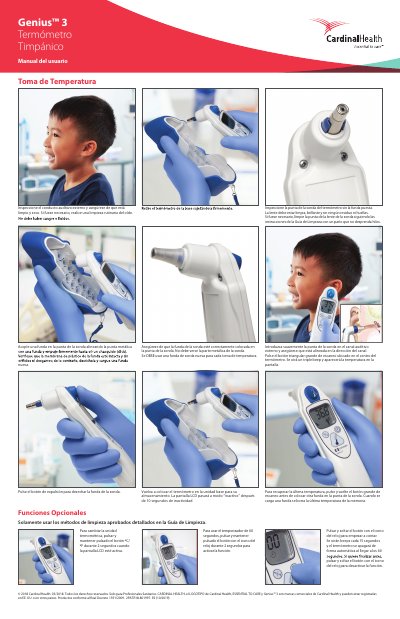
This one-page Spanish user manual is for the Cardinal Health Genius 3 tympanic thermometer. It explains temperature measurement, probe cover handling, and optional functions such as changing temperature units and using the 60-second timer.
Cleaning must follow the approved Cleaning Guide, and the thermometer returns to the base unit for storage. The LCD becomes inactive after 10 seconds of inactivity. This manual is written in Spanish.
| Temperature unit change hold time | 2 seconds |
|---|---|
| 60-second timer activation hold time | 2 seconds |
| Timer beep interval | Every 15 seconds |
| Automatic shutoff timer | 60 seconds |
| LCD inactive time | 10 seconds |
Press and hold the °C/°F button for 2 seconds while the LCD screen is active.
Press and hold the clock icon button for 2 seconds to activate it, then press and release it to start counting; beeps sound every 15 seconds and it shuts off automatically at 60 seconds.
The LCD goes to inactive mode after 10 seconds of inactivity.
Yes, a new probe cover must be used for each temperature measurement.