
Key facts
- Brand
- Cardinal Health
- Model
- Genius 3
- Industry
- Health
- Documents
- 3
- Languages
- EN · ES
- Last added
- 2026-10-28
Start here
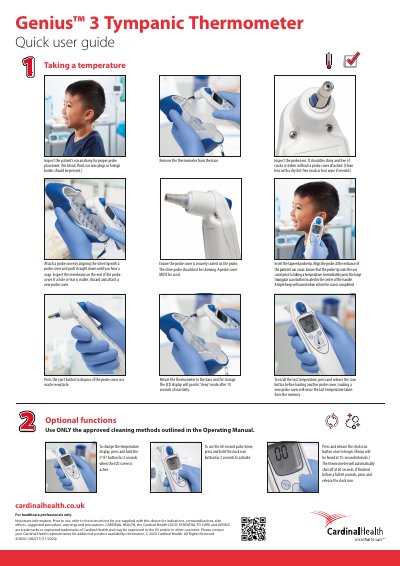
Cardinal Health Genius 3 Tympanic Thermometer Quick User Guide
This document provides a concise overview of how to use the Genius 3 Tympanic Thermometer. It details the procedure for inspecting the patient's ear anatomy, attaching probe covers, inserting the probe, and taking a temperature reading using the scan button.
The guide also outlines optional functions such as changing the temperature display between Celsius and Fahrenheit, setting a 60-second pulse timer with audible beeps, and proper storage. It concludes with important safety information regarding cleaning methods and intended use for healthcare professionals only.
Cardinal Health Genius 3 specifications
| Temperature unit change hold time | 2 seconds |
|---|---|
| 60-second timer activation hold time | 2 seconds |
| Timer beep interval | Every 15 seconds |
| Automatic shutoff timer | 60 seconds |
| LCD inactive time | 10 seconds |
Source: Cardinal Health Genius 3 Tympanic Thermometer User Manual
All Cardinal Health Genius 3 documents by type
The shortest path to a working setup, usually only a few pages.
Day-to-day operation, settings and troubleshooting. Start here if the product is already set up.
Questions answered in these manuals
How do I recall the last temperature taken?
Press and release the scan button before loading another probe cover.
From: Cardinal Health Genius 3 Tympanic Thermometer Quick User Guide
What happens if I load a new probe cover?
Loading a new probe cover will erase the last temperature taken from the memory.
From: Cardinal Health Genius 3 Tympanic Thermometer Quick User Guide
Can the Genius 3 thermometer be soaked or rinsed under water?
No, you must not soak, submerge, spray, or rinse the thermometer and base under water.
From: Cardinal Health Genius 3 Tympanic Thermometer Cleaning Guide
What is the recommended method for cleaning a dirty lens?
Wipe with a lint-free cloth; if soiled, use a cloth or cotton bud dampened with 70% Isopropyl alcohol.
From: Cardinal Health Genius 3 Tympanic Thermometer Cleaning Guide
How do you change the temperature unit?
Press and hold the °C/°F button for 2 seconds while the LCD screen is active.
From: Cardinal Health Genius 3 Tympanic Thermometer User Manual
How is the 60-second timer used?
Press and hold the clock icon button for 2 seconds to activate it, then press and release it to start counting; beeps sound every 15 seconds and it shuts off automatically at 60 seconds.
From: Cardinal Health Genius 3 Tympanic Thermometer User Manual