
A quick user guide for the Cardinal Health Genius 3 Tympanic Thermometer, covering probe placement, usage steps, optional timer functions, and cleaning…
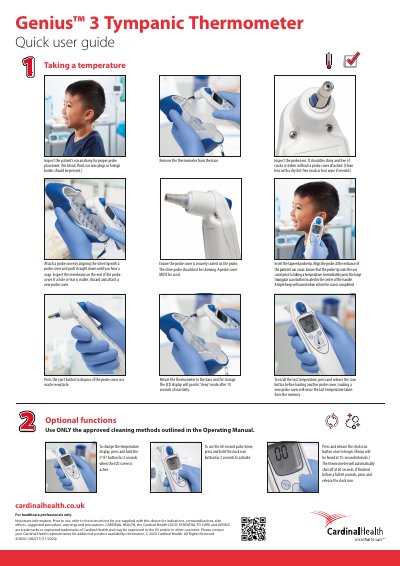
This document provides a concise overview of how to use the Genius 3 Tympanic Thermometer. It details the procedure for inspecting the patient's ear anatomy, attaching probe covers, inserting the probe, and taking a temperature reading using the scan button.
The guide also outlines optional functions such as changing the temperature display between Celsius and Fahrenheit, setting a 60-second pulse timer with audible beeps, and proper storage. It concludes with important safety information regarding cleaning methods and intended use for healthcare professionals only.
Press and release the scan button before loading another probe cover.
Loading a new probe cover will erase the last temperature taken from the memory.
Press and hold the clock icon button for 2 seconds to activate it.