
This is a 10-inch touch screen that supports multiple protocols, including BACnet IP, BACnet MS/TP, Modbus RTU, Modbus TCP, SNMP, OPC, XML-DA, MBus_EnergyMeter_EN, MBus_EnergerMeter, Mbus, MBus_WaterMeter, Mbus European standard calorimeter, domestic calorimeter, domestic water meter, Otis Elevator BA Interface, Otis Elevator, DLT645-1997 multifunctional meter 1997 standard, DLT645-2007 multifunctional meter 2007 standard, Modbus PM800 Schneider meter, Modbus_DAIKIN_IRACC Daikin air conditioning gateway, DAIKIN_DRCH-R5 Daikin P board_Daikin air conditioning monitoring, EMERSON_ACM03U1 Emerson precision air conditioning, Hitachi_Chiller Hitachi chiller, Mitsubishi Melsec_Q_TC
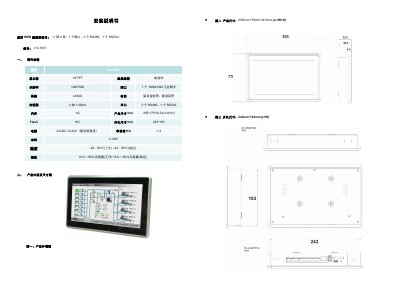
This document is the installation manual for the Xunrao I10-1031 10-inch touch screen. It lists the hardware parameters, product dimensions, installation method, wiring, web server login, and gateway configuration steps.
It also describes supported collection protocols and common problems such as changing or resetting the gateway IP address and communication failures. This manual is written in Chinese.
| Model | I10-1031 |
|---|---|
| Display | 10-inch TFT |
| Touch type | Capacitive |
| Resolution | 1280 x 800 |
| Ethernet | 1 port, 100M/10M industrial network card |
| System | LINUX |
| Material | Aluminum alloy front shell, sheet metal rear shell |
| Processor | 4-core 1.2 GHz |
| Serial ports | 3 RS485 and 1 RS232 |
| Product dimensions | 255 x 175 x 32.5 mm (L x W x H) |
| Flash | 8 GB |
| Cutout dimensions | 242 x 163 mm (L x W) |
| Power | AC/DC 12-24 V (DC recommended) |
| Net weight | 1.3 kg |
| Operating temperature | -20 to 60 C |
| Storage/transport temperature | -40 to 60 C |
| Operating humidity | 10% to 90%, no condensation |
| Storage/transport humidity | 15% to 95%, no condensation |
| Default IP address | 192.168.1.88 |
The gateway defaults to IP address 192.168.1.88 with subnet mask 255.255.255.0 and default gateway 192.168.1.1. Connect a computer directly to the gateway, set the computer to the same subnet, open the gateway web server, and set the IP address under network port settings.
Use a tool such as a SIM ejector to press the button in the FUN hole until the gateway plays music. The network port temporarily restores the default IP address 192.168.1.88, and the original IP address can be viewed after logging in.
Check whether the physical connection, station number, and register address are correct, and whether the batch transfer is too large.
Use a DC power supply. The document warns that some AC power supplies may damage the product.