
This document is an installation guide that introduces the wiring of the DRK-3P-400-D100 model 3 phase direct connected 100 Amps kWh DIN rail meter.
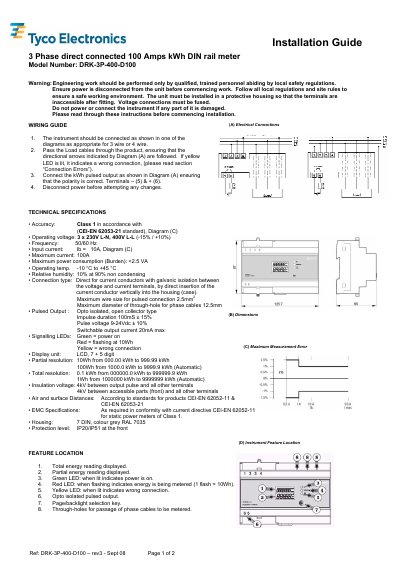
This guide provides step-by-step instructions for installing the DRK-3P-400-D100 3-phase direct-connected kWh meter on a DIN rail. It covers electrical connections for 3- or 4-wire systems, LED indicators for power, metering, and connection errors, and operational controls. Safety precautions require qualified personnel and power disconnection before installation. The meter displays total and partial energy readings with selectable backlight and resolution modes.
The device features galvanic isolation between voltage and current terminals, an opto-isolated pulsed output, and compliance with CEI-EN standards. Connection errors trigger a yellow LED, and phase errors can be diagnosed using the 'Sel' key. The meter operates from 3x230V to 400V, supports 50/60Hz, and has a maximum current rating of 100A.
| Accuracy | Class 1 in accordance with CEI-EN 62053-21 standard |
|---|---|
| Operating Voltage | 3 x 230V L-N, 400V L-L (-15% / +10%) |
| Frequency | 50/60 Hz |
| Input Current | Ib = 10A |
| Maximum Current | 100A |
| Operating Temperature | -10 °C to +45 °C |
| Relative Humidity | 10% at 90% non condensing |
| Connection Type | Direct for current conductors with galvanic isolation |
| Pulsed Output Voltage | 9-24Vdc ± 10% |
| Switchable Output Current | 20mA max |
| Display Unit | LCD, 7 + 5 digit |
| Insulation Voltage | 4kV between output pulse and all other terminals |
| Housing Color | Grey RAL 7035 |
| Protection Level | IP20/IP51 at the front |
The yellow LED indicates a wrong connection. Check the installation for errors and refer to the 'Connection Errors' section.
To reset the partial energy reading, select the partial reading only and press and hold the 'Sel' key for more than 4 seconds.
The maximum current rating is 100A.
The operating temperature range is -10 °C to +45 °C.