
This file is a part of the user manual of Canon CP-WU5500/CP-WX5500/CP-X5550 CP-WU5505/CP-WX5505/CP-X5555, which details the technical information of the product, including the supported signal types, resolutions, frequencies, etc.
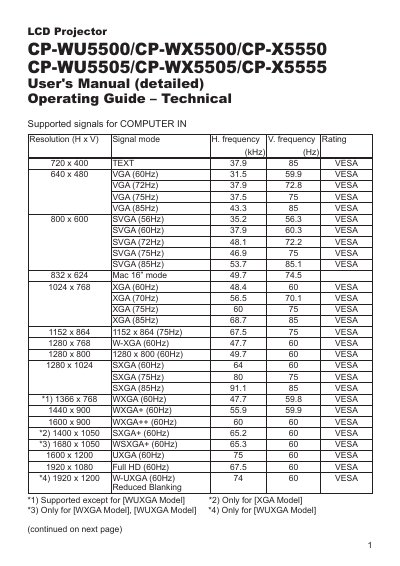
This document is the detailed user's manual and technical operating guide for Hitachi LCD projectors in the CP-WU5500/CP-WX5500/CP-X5550 and CP-WU5505/CP-WX5505/CP-X5555 groups. It lists supported input signals and connection details for the projector ports.
The manual includes signal timing tables for computer, HDMI/HDBaseT, and MHL inputs, plus pin assignments for ports such as COMPUTER IN, HDBaseT, HDMI, VIDEO, audio, CONTROL, LAN, USB wireless adapter, and remote control. It also documents PJLink commands for power, input selection, AV mute, error status, lamp status, and projector information.
| COMPUTER IN / MONITOR OUT connector | D-sub 15pin mini shrink jack |
|---|---|
| HDMI connector | Digital audio/video connector |
| HDMI audio | Linear PCM (Sampling rate; 32/44.1/48 kHz) |
| VIDEO input systems | NTSC, PAL, SECAM, PAL-M, PAL-N, NTSC4.43, PAL(60Hz) |
| Composite video signal | Composite video signal, Analog, 1.0+0.1Vp-p, 750 terminator |
| Computer video signal | RGB separate, Analog, 0.7Vp-p, 750 terminated |
| Component video systems | 480i@60, 480p@60, 576i@50, 720p@50/60, 1080i@50/60, 1080p@50/60 |
| Audio input impedance | 47kQ |
| Audio output impedance | 1kOQ |
| CONTROL connector | D-sub 9pin plug |
| USB port | Only for USB wireless adapter |
| REMOTE CONTROL connector | 3.5 stereo mini jack |
| PJLink manufacturer name | HITACHI |
Only the signal input from COMPUTER IN can be output from MONITOR OUT.
HDMI supports Linear PCM at sampling rates of 32, 44.1, or 48 kHz.
The VIDEO input supports NTSC, PAL, SECAM, PAL-M, PAL-N, NTSC4.43, and PAL(60Hz).
PJLink reports the manufacturer name as HITACHI.