
This is a user manual for MT600 (10000mAh Router), which includes the appearance, functions, usage methods and troubleshooting methods of the device.
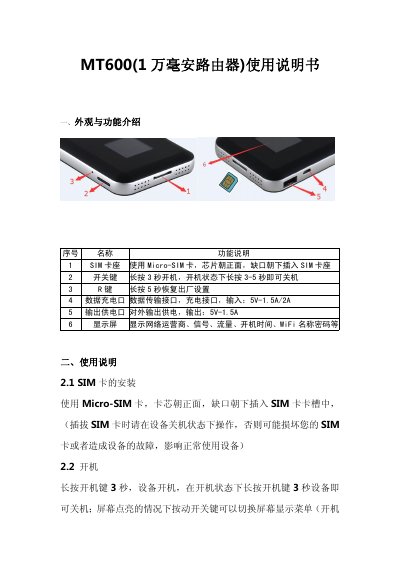
The MT600 10000mAh router manual first describes the device parts: a Micro-SIM card slot, power key, R key for restoring factory settings, a data/charging port with 5V-1.5A/2A input, an output power port at 5V-1.5A, and a display that shows the network operator, signal, data usage, power-on time and Wi-Fi name and password.
It then walks through inserting the Micro-SIM card, powering the device on and off, connecting phones or laptops to the Wi-Fi network (GB3-XXXX, password 1234567890), and logging in to the gateway at 192.168.100.1 with the default username and password admin. The management chapters cover APN configuration, data statistics and data control, WLAN management, system management, SMS, and connecting a desktop computer without wireless via USB. The final chapters give simple troubleshooting steps and safety notices. This manual is written in Chinese.
| SIM card type | Micro-SIM |
|---|---|
| Data/charging port input | 5V-1.5A/2A |
| Output power port | 5V-1.5A |
| Battery capacity | 10000mAh |
| Default gateway address | 192.168.100.1 |
| Default gateway username and password | admin / admin |
| Default Wi-Fi network name | GB3-XXXX |
| Default Wi-Fi password | 1234567890 |
Enter 192.168.100.1 in the browser address bar to open the login page, then log in with the default username and password, admin.
Long press the power key for 3 seconds and the device powers on.
Insert a card pin or toothpick into the R hole below the power key and press for 5 seconds; the device restarts automatically and the factory reset is complete.
Yes. Connect the device to the computer with a USB cable; the network card driver installs automatically and the computer can then connect to the internet, while Wi-Fi can be used at the same time.