
Key facts
- Manuals
- 5
- Categories
- 1
- Languages
- ZH
- Last added
- 2026-10-03
Featured MT manuals
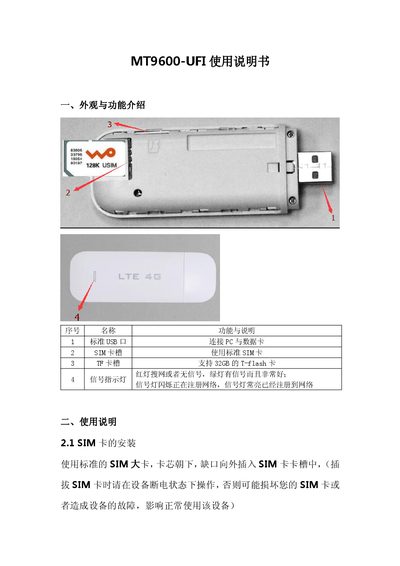
MT MT9600-UFI User Manual
This manual introduces the MT9600-UFI device, describing its external ports such as the standard USB, SIM card slot, and TF card slot that supports up to 32 GB. It explains the signal indicator LEDs and the default Wi‑Fi network name (4G-UFI-XXXX) with password.
Detailed usage instructions cover SIM card installation, Wi‑Fi connection, gateway login (default IP 192.168.100.1, username/password admin), APN configuration, traffic statistics and management, WLAN settings, system management, SMS functions, troubleshooting steps, and safety precautions for proper operation. This manual is written in Chinese.
Covers: 外观与功能介绍 · 使用说明 · SIM卡的安装 · WiFi的连接 · 网关登陆 · 网关管理

MT MT-5204 4-Port Hub Product Manual
The MT-5204 4‑port hub is designed for complex electromagnetic environments and large RS‑485 systems. It supports transmission speeds up to 115.2 Kbps, uses optical isolation with 2500 V isolation voltage, and includes 600 W surge‑protect circuits to suppress lightning and ESD.
The device offers a star‑topology RS‑485 bus, short‑circuit and open‑circuit protection on each port, and is suitable for outdoor power‑collection applications. It operates from a +9 V to +30 V DC supply and can be mounted with or without a rail base. This manual is written in Chinese.
Covers: Overview · Product Parameters · Panel and Signal Indicators · Operation and Display Instructions · Common Applications · Port Fault Alarm and Protection Mechanism
MT MT1302USB USB Digital Microscope User Manual
This manual introduces the MT1302USB USB digital microscope, a handheld device for viewing small objects, suitable for education, research, and inspection. It describes the hardware features such as 10‑200× magnification, built‑in LED illumination, and USB 2.0 connectivity, and explains how the MiViewCap software enables photo capture, video recording, and measurement.
The document covers safety warnings, required system specifications, step‑by‑step installation of the MiViewCap software, operating procedures, accessory list, technical specifications, and a troubleshooting section with common issues and their solutions. This manual is written in Chinese.
Covers: Introduction · Safety Warnings · Installation and Setup · Software Installation · Operating Instructions · Specifications
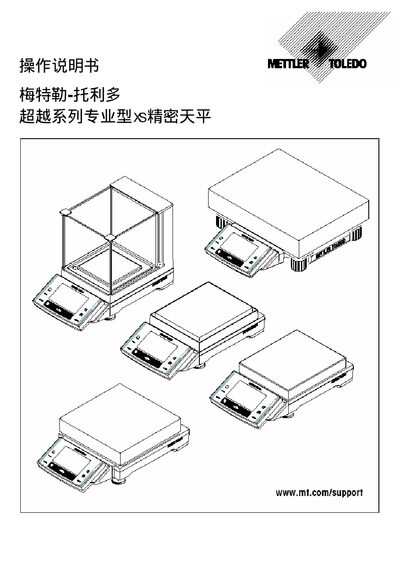
Mettler-Toledo XS Precision Balance Operating Manual
The XS series precision balance from Mettler‑Toledo is a high‑accuracy laboratory instrument designed for a range of weighing applications, including basic, statistical, density and dynamic measurements. It offers safety support options such as 10 mg and 0.1 g + 1 g models and includes RS232C and auxiliary sensor interfaces.
The manual covers safety guidelines, mechanical assembly of the balance, operation of the display and software, calibration procedures (automatic and external), use of the RS232C and AUX ports, and detailed instructions for the various weighing modes and applications such as formulation, percentage and dynamic weighing. This manual is written in Chinese.
Covers: Safety First · Assembly of the Balance · Operation Interface · Calibration and Measurement · RS232C Serial Interface · AUX Sensor Interface
Latest MT manuals
MT MT9600-UFI User Manual
User Manual 9 pages · 551 KB · ZHThe MT9600-UFI user manual provides setup, Wi‑Fi connection, APN configuration, traffic management, and safety instructions for the device.
MT MT-5204 4-Port Hub Product Manual
User Manual 7 pages · 200 KB · ZHThe MT-5204 4‑port hub provides isolated RS‑485 communication with surge protection for harsh electromagnetic environments.
MT G5130/G5131 PSM Step-up DC/DC Converter handbook
G5130/G5131 is a PSM step-up DC/DC converter designed for use with 1~4 cell alkaline batteries. It has an output voltage range of 2.5V~5.0V, a maximum oscillation frequency of 100kHz, and an efficiency of up to 80%. It features high output voltage accuracy and low temperature coefficient.
MT MT1302USB USB Digital Microscope User Manual
User Manual 25 pages · 2 MB · ZHThe MT MT1302USB USB digital microscope user manual provides setup, operation, specifications, and troubleshooting instructions.
Mettler-Toledo XS Precision Balance Operating Manual
User Manual 148 pages · 2.3 MB · ZHThe Mettler-Toledo XS precision balance operating manual provides instructions for setup, operation, calibration, and software use.
Which document do I need?
User Manual
Day-to-day operation, settings and troubleshooting. Start here if the product is already set up.
Questions answered in MT manuals
How do I install the SIM card?
Insert a standard SIM card with the chip side down and the notch outward while the device is powered off.
How can I connect to the device's Wi‑Fi?
Search for the SSID 4G-UFI-XXXX, enter the password 1234567890, and confirm the connection.
What is the isolation voltage of the MT‑5204 hub?
The hub provides an isolation voltage of 2500 V.
What temperature range can the MT‑5204 operate in?
The device operates from –25 °C to +70 °C.
What safety features are included in the XS series balance?
The balance provides safety support options such as a 10 mg model and a 0.1 g + 1 g model.
How can the balance be calibrated?
It offers a fully automatic calibration function (ACT) and also supports external calibration devices.