
The MT9600-UFI user manual provides setup, Wi‑Fi connection, APN configuration, traffic management, and safety instructions for the device.
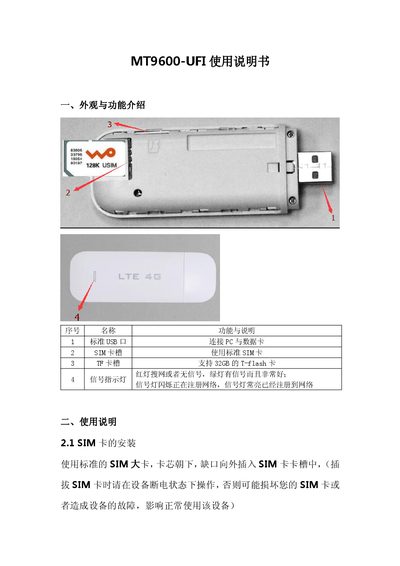
This manual introduces the MT9600-UFI device, describing its external ports such as the standard USB, SIM card slot, and TF card slot that supports up to 32 GB. It explains the signal indicator LEDs and the default Wi‑Fi network name (4G-UFI-XXXX) with password.
Detailed usage instructions cover SIM card installation, Wi‑Fi connection, gateway login (default IP 192.168.100.1, username/password admin), APN configuration, traffic statistics and management, WLAN settings, system management, SMS functions, troubleshooting steps, and safety precautions for proper operation. This manual is written in Chinese.
| USB interface | Standard USB port for PC and data card |
|---|---|
| SIM card slot | Standard SIM card slot |
| TF card slot capacity | Supports up to 32 GB TF (micro‑SD) card |
| Default Wi‑Fi SSID | 4G-UFI-XXXX |
| Default login credentials | Username: admin, Password: admin |
| Default gateway IP | 192.168.100.1 |
| Signal indicator LEDs | Red = searching/no signal, Green = good signal; flashing = registering, solid = registered |
Insert a standard SIM card with the chip side down and the notch outward while the device is powered off.
Search for the SSID 4G-UFI-XXXX, enter the password 1234567890, and confirm the connection.
Open a browser to 192.168.100.1 and log in with username "admin" and password "admin".
In System Management → Device Operation, select "Restore default settings" to reset the device.