
This manual describes the basic operating methods of the Philips phone, including the phone's composition, key operation, icons and symbols, first use, how to install SIM cards, how to charge the phone, how to make phone calls, how to send and receive messages, etc.
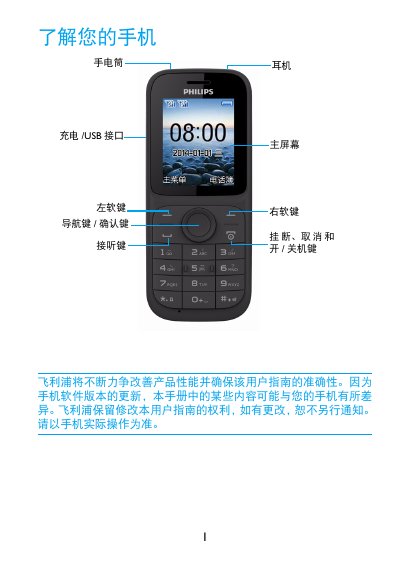
The Philips E101 user manual explains the phone keys, standby screen, display icons, SIM card and battery installation, charging, and Micro SD card use. It also covers making calls, sending messages, text entry, and managing the phonebook.
The document includes troubleshooting notes for messages such as “Insert SIM card” and charging problems, plus warranty and after-sales service information and a SAR statement referencing GB21288-2007. This manual is written in Chinese.
| Text input modes | Pinyin, stroke, basic English, numeric and symbol input |
|---|---|
| Storage expansion | Micro SD card |
In standby mode, long-press < to lock the keyboard; or first press the other indicated key, then press < to lock or unlock it.
If the battery is completely discharged, wait a few minutes, usually no more than five minutes, for the charging icon to appear on the screen.
The phone supports Pinyin, stroke, basic English, numeric and symbol input modes.
Open the card holder, align the Micro SD card with the slot, and place it into the slot.