
Medtronic MiniMed 780G System Sure-T Infusion Set Quick Reference Guide

quick reference guide, introduce how to change the minimed 780g system's minimed sure-t infusion set
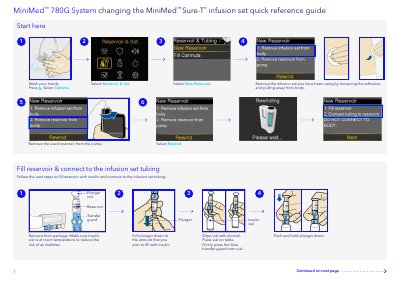

Medtronic MiniMed 780G System Sure-T Infusion Set Quick Reference Guide - cover page
Brand
Medtronic
Category
Home medical equipment
Document type
Quick Start Guide
Language
English
Pages
4
File format
PDF
File size
2.1 MB
Published
27 October, 2023
Updated
27 October, 2023
MD5 checksum
8723E613479F20D0597109A63C1F3CD1

About this manual

This Medtronic quick reference guide explains how to change the MiniMed Sure-T infusion set on the MiniMed 780G System. It covers washing your hands, filling the reservoir with insulin, and connecting the filled reservoir to the infusion set tubing.

The guide then shows how to load the reservoir into the pump, fill the tubing until drops appear at the end, and insert the infusion set needle straight in at a 90 degree angle. Selecting Done on the pump completes the infusion set change.

What's inside

  • Start here
  • Fill reservoir & connect to the infusion set tubing
  • Connect reservoir to infusion set
  • Place reservoir into pump
  • Load reservoir and fill tubing
  • Insert infusion set
  • Your infusion set change is now complete!

Specifications

Insertion angle90 degree
Insulin fill duration2-3 days

Frequently asked questions

What should I do if the screen backlight has turned off?

Press any button to turn the screen back on.

At what angle should the infusion set needle be inserted?

Insert the needle straight in at a 90 degree angle.

How much insulin should be put in the reservoir?

Fill with the amount of insulin needed for 2-3 days.

Download PDF (2.1 MB)

More Medtronic Manuals


View all Medtronic manuals →