
Key facts
- Brand
- Medtronic
- Model
- MiniMed 780G System
- Category
- Home medical equipment
- Documents
- 2
- Languages
- EN
- Last added
- 2023-10-27
Start here
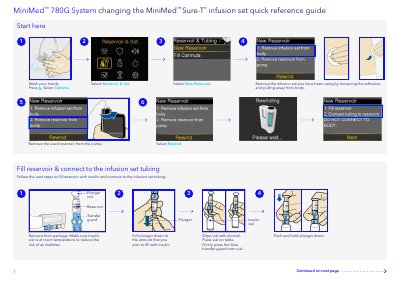
Medtronic MiniMed 780G System Sure-T Infusion Set Quick Reference Guide
This Medtronic quick reference guide explains how to change the MiniMed Sure-T infusion set on the MiniMed 780G System. It covers washing your hands, filling the reservoir with insulin, and connecting the filled reservoir to the infusion set tubing.
The guide then shows how to load the reservoir into the pump, fill the tubing until drops appear at the end, and insert the infusion set needle straight in at a 90 degree angle. Selecting Done on the pump completes the infusion set change.
Medtronic MiniMed 780G System specifications
| Indicated patient age | 7-80 years |
|---|---|
| Minimum total daily insulin dose | 8 units per day or more |
| Compatible glucose sensor | Guardian Sensor (3) |
All Medtronic MiniMed 780G System documents by type
The shortest path to a working setup, usually only a few pages.
Questions answered in these manuals
What should I do if the screen backlight has turned off?
Press any button to turn the screen back on.
From: Medtronic MiniMed 780G System Sure-T Infusion Set Quick Reference Guide
At what angle should the infusion set needle be inserted?
Insert the needle straight in at a 90 degree angle.
From: Medtronic MiniMed 780G System Sure-T Infusion Set Quick Reference Guide
What is the MiniMed 780G system intended to do?
It is intended for continuous delivery of basal insulin at selectable rates, administration of insulin boluses at selectable amounts, and continuous glucose monitoring in fluid under the skin.
Which glucose sensor is compatible with the MiniMed 780G insulin pump?
The Guardian Sensor (3) is the only sensor compatible with the MiniMed 780G insulin pump and Guardian Link (3) transmitter.