
Newport HT70 Plus Ventilator Quick Guide
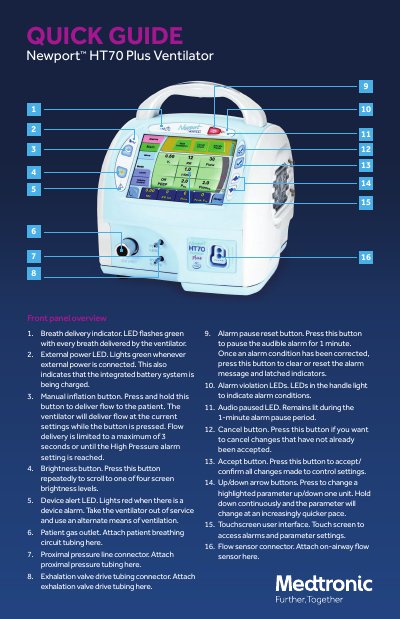
This quick guide explains the front panel controls and touchscreen interface of the Medtronic HT70 Plus Ventilator. Key features include breath delivery indicators, manual inflation, alarm systems, and parameter adjustment buttons. The touchscreen allows access to modes, breath types, and monitored data. The device supports three operational domains: Basic, Transport, and Hospital, with options for auto-lock and battery status monitoring.
It flashes green with every breath delivered by the ventilator.
Flow delivery is limited to a maximum of 3 seconds or until the High Pressure alarm setting is reached.
It pauses the audible alarm for 1 minute and clears or resets the alarm message and latched indicators once corrected.
It shows the charge level of the Power Pac battery pack (blue icon) during external power or Power Pac use, or the charge level of the backup battery (red icon) during backup battery use.