
This is an installation guide for prox.pad proximity reader/keypad access control
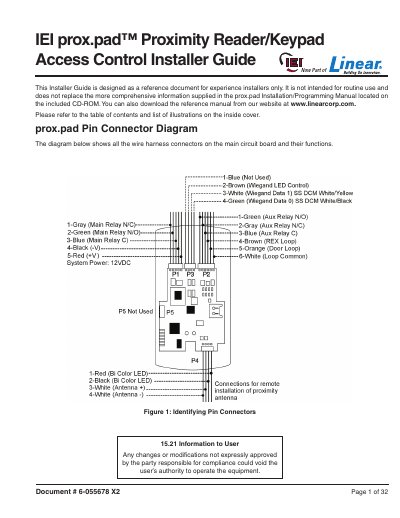
This guide provides detailed instructions for installing the IEI prox.pad™ Proximity Reader/Keypad. It covers mounting options including wall, glass, and secure installations, wiring diagrams for various components, and programming commands. The document is intended for experienced installers and includes specifications, part lists, and safety cautions. It references a companion programming manual on CD-ROM and provides diagrams for pin connectors and installation steps.
| Operating Temperature | -31° to 150° F (-35° to 66° C) |
|---|---|
| Operating Humidity | 5% to 95% relative humidity, non-condensing |
| Main Relay | Form C, switches up to 2A |
| Aux Relay | Form C, switches up to 1A |
| Unit Capacity | 2000 users (standalone mode only) |
| Height | 5.25 in (13.3 cm) |
| Width | 2.75 in (7 cm) |
| Depth | 1.375 in (3.5 cm) |
From -31° to 150° F (-35° to 66° C).
All HID cards up to 40 bits, including Prox Card III, Prox IIDuo, Prox II, and Proxkey FOB.
2000 users (each user can have a card, PIN or both).