
PWS3261 is an HMI product launched by Hitech Electronics Corp., which supports USB download/upload function.
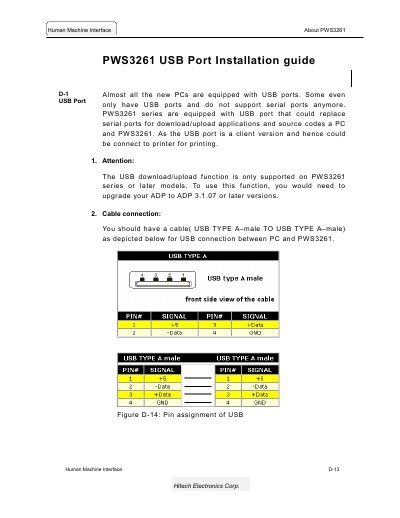
This guide from Hitech Electronics Corp. explains how to use the USB port on the PWS3261 Human Machine Interface to replace serial ports for download and upload between a PC and the HMI. It covers cable connection, hardware detection and USB driver installation, and the ADP transmission settings needed.
The guide then walks through downloading firmware and applications from the PC to the HMI, uploading applications, and downloading or uploading source codes through USB, including the messages shown on the PC and HMI and what to check when an error appears.
| USB cable | USB Type A male to USB Type A male |
|---|---|
| DIP switch setting | Switch 7 set to ON |
| Software requirement | ADP 3.1.07 or later |
| Supported models | PWS3261 series or later models |
A USB Type A male to USB Type A male cable.
ADP 3.1.07 or later versions.
Switch 7 of the HMI must be ON.
Check the USB setting or the cable connection.