
Dell Dimension 3100/E310 User Guide, introduces the features and characteristics of the product, installation and use methods, precautions, etc.
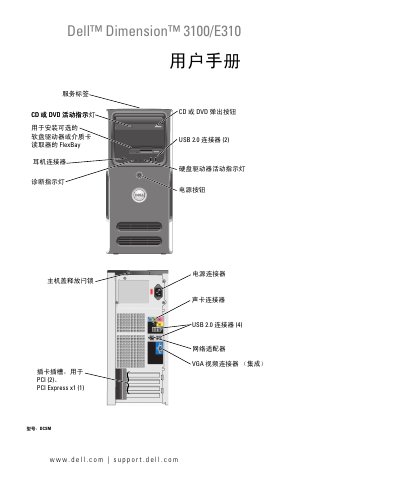
This document is the user manual for the Dell Dimension 3100/E310 desktop computer. It covers initial setup, connecting peripherals like printers and networks, and using the operating system features. The guide includes specific instructions for installing optional components such as floppy drive bays and media card readers. This manual is written in Chinese.
| Processor Type | Intel Pentium 4 or Intel Celeron D |
|---|---|
| Memory Type | 400 MHz and 533 MHz DDR2 Unbuffered SDRAM |
| Maximum Memory | 2 GB |
| Chipset | Intel 915GV |
| RAID Support | RAID 1 (Mirroring) |
| Network Interface | Integrated 10/100 |
| Power Supply | 230 W |
| Height | 41.4 cm (16.3 inches) |
The computer supports 400 MHz and 533 MHz DDR2 Unbuffered SDRAM.
The maximum memory capacity is 2 GB.
Yes, the system supports RAID 1 (Mirroring).
The power supply unit has a power rating of 230 W.