
This document is a quick guide for commissioning Sungrow's SG30/50/110CX inverters
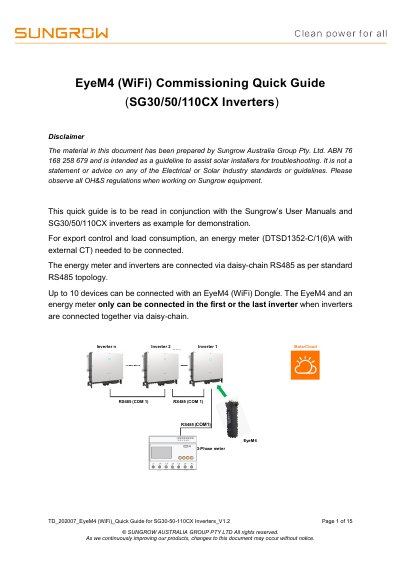
This document serves as a guideline for solar installers to commission the EyeM4 (WiFi) dongle for Sungrow SG30/50/110CX inverters. It outlines the necessary steps for RS485 wiring, connecting energy meters, and setting up the iSolarCloud application for online monitoring. The guide also details how to enable remote maintenance and configure export control parameters.
| Max Devices per Daisy-Chain | 10 |
|---|---|
| Default EyeM4 IP Address | 11.11.11.1 |
| Default EyeM4 Password | pw1111 |
| Default iSolarCloud Login Password | pw8888 |
| RS485 Termination Resistance | 120 Ohm |
The default IP address for the EyeM4 setup via WLAN is 11.11.11.1.
Up to 10 devices can be connected with an EyeM4 (WiFi) Dongle.
The energy meter should be connected to the first or the last inverter in the chain.
The server domain address is api.isolarcloud.com.hk.