
This is a quick start guide for Ohaus Defender™ 3000 (with T31 Indicators), introducing its assembly, safety precautions and button functions
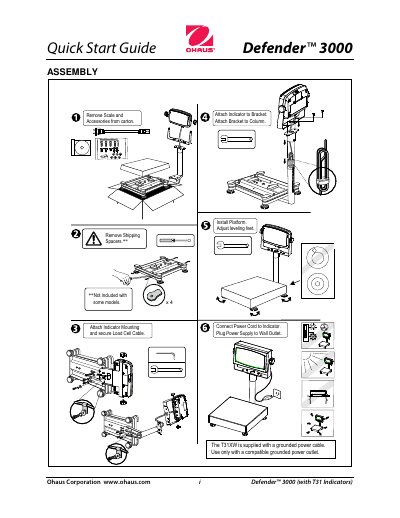
This guide explains how to assemble and operate the Ohaus Defender™ 3000 scale with T31 indicators. It includes safety precautions, basic functions like zeroing and taring, and how to navigate the menu for settings such as units and parts counting. The guide also covers calibration verification and unit conversion.
Press and hold ON for two seconds to turn the indicator on.
Zero is set automatically at power on or manually by pressing ZERO when the scale is stable.
Place the empty container on the scale and press TARE to store its weight in memory, then the net weight will be displayed.
Press and hold Units until the desired measuring unit appears. Only units enabled in the Unit Menu are displayed.