
Logicube, Inc. ZXi Adapter Guide v1.2 2019 ZXi, ZXi-Laptop, ZXi-10G drive adapter guide

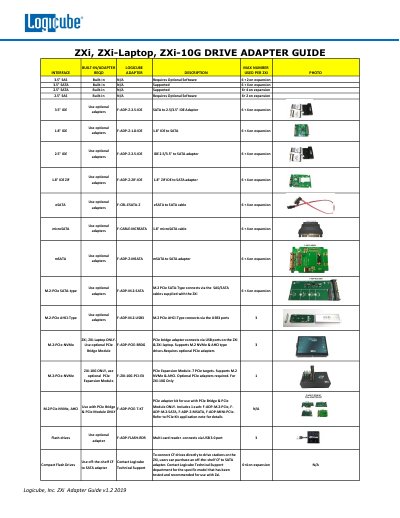
This document is the Logicube, Inc. ZXi Adapter Guide v1.2 2019 ZXi, ZXi-Laptop, ZXi-10G drive adapter guide, which introduces the drive types supported by ZXi and the required adapters.

Logicube, Inc. ZXi Adapter Guide v1.2 2019 ZXi, ZXi-Laptop, ZXi-10G drive adapter guide - cover page
Brand
Logicube
Category
Other Computer Accessories
Document type
Product Leaflet
Language
English
Pages
1
File format
PDF
File size
581 KB
Published
19 October, 2023
Updated
19 October, 2023
MD5 checksum
2A06AC7A117DCA3F9421ED2FCF8484B1

About this manual

This document serves as an adapter guide for Logicube ZXi series drive stations, including the ZXi, ZXi-Laptop, and ZXi-10G models. It details the number of supported drives for various built-in and expansion configurations.

What's inside

  • Adapter Description
  • Max Number Used Per ZXi
  • 3.5" SAS
  • 3.5" SATA
  • 2.5" SATA
  • 2.5" SAS
  • M.2-PCIe NVMe
  • Flash drives
  • Compact Flash Drives

Specifications

3.5" SAS Built-inN/A
3.5" SATA Built-inN/A
2.5" SATA Built-inN/A
2.5" SAS Built-inN/A
M.2-PCIe NVMe (ZXi-10G)1

Frequently asked questions

What is the maximum number of 3.5" SATA drives supported built-in?

The maximum number of 3.5" SATA drives supported built-in is N/A.

Which M.2 PCIe drive types require the ZXi-10G model?

The M.2 PCIe NVMe and AHCI drive types require the ZXi-10G model.

How many PCIe targets does the optional PCIe Expansion Module support?

The optional PCIe Expansion Module supports 7 PCIe targets.

Download PDF (581 KB)

More Logicube Manuals


View all Logicube manuals →