
Digi Connect Wan 3G Application Guide

This document introduces how to connect Digi Connect Wan 3G, and use Realport to connect Digi Serial Server

Digi Connect Wan 3G Application Guide - cover page
Brand
Digi
Category
Industrial Supply
Document type
Other
Language
English
Pages
6
File format
PDF
File size
560 KB
Published
18 October, 2023
Updated
18 October, 2023
MD5 checksum
29651BD1C84E5EBCB39D1E2E85516983

About this manual

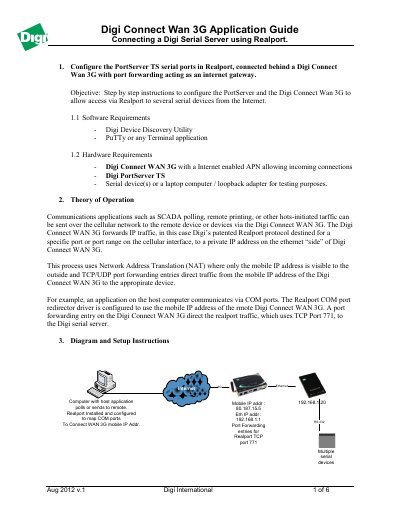
This document provides step-by-step instructions to configure a Digi PortServer TS and a Digi Connect Wan 3G device to allow access to serial devices from the Internet using the Realport protocol. The guide covers software and hardware requirements, the theory of operation involving NAT and port forwarding, and detailed setup procedures.

What's inside

  • Software Requirements
  • Hardware Requirements
  • Theory of Operation
  • PortServer TS Configuration
  • Connect WAN 3G Configuration
  • Realport Installation
  • Network Settings
  • Port Forwarding

Frequently asked questions

What applications can be sent over the cellular network to remote devices?

Communications applications such as SCADA polling, remote printing, or other host-initiated traffic can be sent over the cellular network.

Which TCP port is used for Realport traffic forwarding?

The Realport traffic uses TCP Port 771 to direct traffic from the mobile IP address to the serial server.

How many forwarding rules can be configured on the Digi Connect WAN 3G?

You may configure up to 64 forwarding rules for external networks to internal devices.

Download PDF (560 KB)

More Digi Manuals


View all Digi manuals →