
This document is a quick installation guide for Tenda AC19/AC23 routers
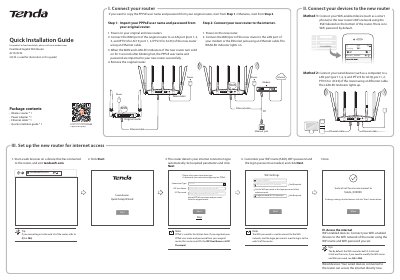
This document provides a quick installation guide for the Tenda AC19 and AC23 Dual Band Gigabit WiFi Routers. It details two methods for setting up internet access: importing PPPoE credentials from an original router or connecting directly to a modem. The guide includes step-by-step instructions for powering on the device, connecting Ethernet cables, and accessing the web-based configuration interface via tendawifi.com.
| Operating Frequency (2.4 GHz) | EU/2400-2483.5MHz (CH1-CH13) |
|---|---|
| Operating Frequency (5 GHz) | EU/5150-5250MHz (CH36-CH48) |
| EIRP Power Max (2.4 GHz) | 19.86 dBm |
| EIRP Power Max (5 GHz) | 22.96 dBm |
| Software Version | V16.03.07.XX |
Log in to the web UI, navigate to Wireless Settings > WiFi Name & Password Page, and customize them.
Only devices supporting 5 GHz signals can connect; by default, both bands share the same name.