
This manual introduces the overview, architecture, programming, system register description, peripheral register modules, general-purpose I/O module and timer/counter module of MAXQ610 microcontroller
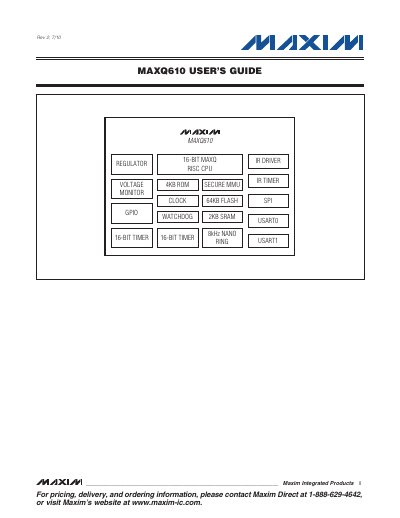
The document provides a comprehensive user's guide for the MAXQ610, a 16-bit Reduced Instruction Set Computing (RISC) microcontroller. It details the device's modular architecture, Harvard memory structure, and instruction set designed for low-cost, low-power embedded applications.
The manual covers system-level topics including memory management units, clock generation, interrupt handling, and power modes. It also provides in-depth descriptions of peripheral register modules such as General-Purpose I/O (GPIO), Timers/Counters, USARTs, SPI, and the In-System Programming (JTAG) interface.
| Instruction Set Architecture | 16-bit RISC |
|---|---|
| Program Memory Size | 64KB Flash |
| Data Memory Size | 2KB SRAM |
All instructions on the MAXQ610 microcontroller are fixed at a length of 16 bits.
The system register set includes working accumulator registers, and there are 16 accumulators available.
The program memory must be 16 bits wide to accommodate the instruction word size.