
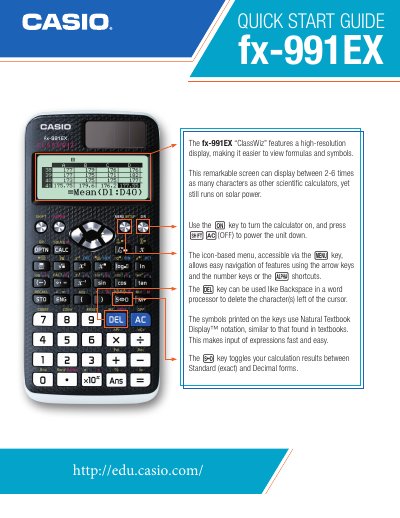
This Quick Start Guide introduces the main functions of the Casio fx-991EX ClassWiz scientific calculator, covering power on/off, navigation of the icon‑based menu, and basic calculation modes. It explains how to use the Natural Textbook Display™ notation for entering formulas and how to toggle between exact and decimal result formats.
The guide also details advanced features such as matrix and vector operations, spreadsheet creation, unit conversions, and solving equations with Newton’s method. Step‑by‑step examples illustrate conversions, engineering notation, and the use of the SOLVE command for unknowns.
| Power source | solar power |
|---|---|
| Notation | Natural Textbook Display™ |
| Matrix size | up to 4×4 |
| Spreadsheet capacity | 5 columns × 45 rows |
Use the power key to turn the calculator on, and press {Ac} (OFF) to power it down.
Press the toggle key to switch calculation results between Standard (exact) and Decimal forms.