
This document describes the functions and accessories of the DVR-6000G (VB1+) model, as well as installation positions and precautions.
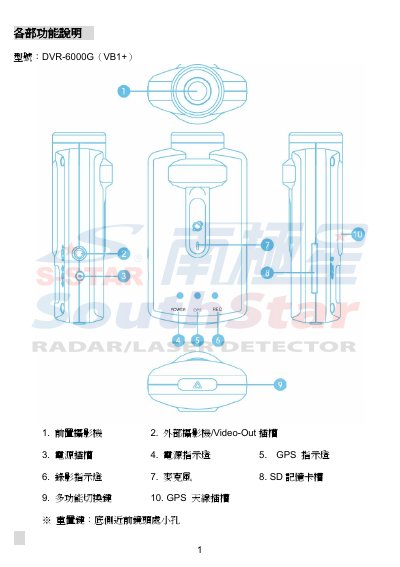
The Southstar DVR-6000G (VB1+) is a dash cam featuring front and rear camera support, GPS functionality, and G-Sensor impact detection. It supports SDHC cards ranging from 2GB to 16GB with Class 4 or Class 6 speed ratings. The device includes features such as loop recording, event recording upon impact, and automatic video capture based on vehicle movement. This manual is written in Chinese.
| Recommended SD Card Capacity | 2-16 GB |
|---|---|
| SD Card Speed Class | Class 4 or Class 6 |
Press and hold the multi-function button for five seconds to format the SD memory card and delete all video files.
The manual recommends using a SanDisk SDHC card with a capacity between 2 and 16 GB and a speed class of C4 or C6.
The device is set to automatically shut off when the vehicle voltage drops below 11.8V to prevent battery drain.
When a collision is detected, the system automatically records the 15 seconds immediately preceding and following the event.