
This manual introduces the steps to use CD-2e, including how to use the CD-2e's built-in microphone to record a performance to an SD memory card, as well as how to write your recorded performance onto a CD
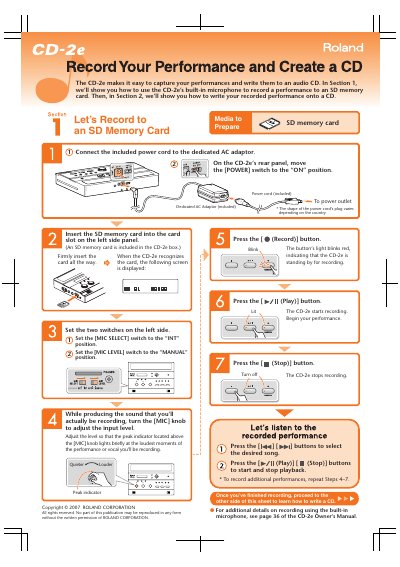
The Roland CD-2e is an all-in-one unit designed for easy CD recording without a computer. It features a built-in stereo microphone, stereo speakers, and a CD-R/RW drive, allowing users to record audio directly to discs or SD cards. The device is lightweight, battery-powered, and includes a wireless remote controller for convenient operation.
| Supported SD Memory Card Capacity | 64MB up to 8GB |
|---|---|
| Battery Life | approximately six hours |
| Recording Time (650 MB CD-R) | approximately 74 minutes |
| Recording Time (700 MB CD-R) | approximately 80 minutes |
| Finalization Time | approximately two minutes |
The available display languages are English, German, French, Italian, Spanish, and Japanese.
No, a computer is not required as the unit includes a CD-R/RW drive and speakers for recording and burning.
Yes, you can record directly to a CD-R/RW disc or record selected songs from an SD memory card to a CD-R/RW disc.