
This manual provides installation instructions for the 5000 Series and 5000 Plus Series Rotors (including PRS models).
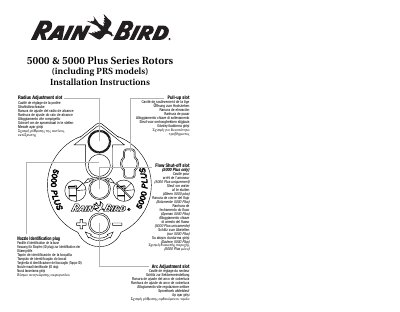
This document provides installation instructions for Rain Bird 5000 and 5000 Plus series rotors, including PRS models. It details the identification of key components such as the nozzle identification plug, arc adjustment slot, pull-up slot, and flow shut-off slot (specific to the 5000 Plus series). The guide is presented in multiple languages, including English, German, Spanish, Greek, and Turkish.
| Adjustable Arc Range | 40 – 360 degrees |
|---|---|
| Factory Arc Setting | 180 degrees |
| Arc Adjustment Increment | 90 degrees per turn |
| Maximum Radius Reduction | 25% |
| Flow Shut-off Mechanism | 180 degree rotation |
The rotor is factory set to 180 degrees.
Each full clockwise turn adds or removes 90 degrees of arc.
Yes, the radius can be reduced up to 25%.
Insert the screwdriver into the Flow Shut-off Slot and turn it clockwise 180 degrees.