
Grande Communications Internet Explorer Configuration User Guide


Grande Communications Internet Explorer Configuration User Guide - cover page
Brand
Internet
Document type
User Manual
Language
English
Pages
5
File format
PDF
File size
9.7 MB
Published
04 July, 2012
Updated
25 July, 2012
MD5 checksum
A75694A440586C4A2FD25CB6BC4C0478

About this manual

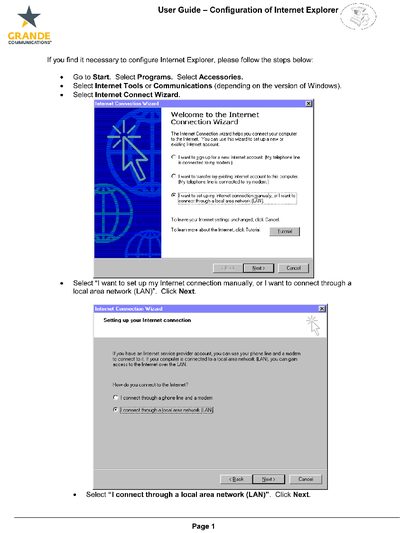
This document serves as a configuration guide for users of Grande Communications services. It details the steps required within the Internet Connection Wizard to establish an internet link via a local area network (LAN).

What's inside

  • Internet Connection Wizard
  • Local Area Network Configuration
  • Email Account Setup
  • Server Name Configuration
  • User ID and Password Entry

Frequently asked questions

How do I connect to the Internet using this guide?

Select 'I want to set up my internet connection manually, or I want to connect through a local area network (LAN)' and click Next.

What server names should I use for the email setup?

You should type 'mail.grandecom.net' in both the Incoming mail server and Outgoing mail server text boxes.

Download PDF (9.7 MB)

More Internet Manuals


View all Internet manuals →