
The document involves the features and characteristics of the product, but the specific content cannot be parsed.
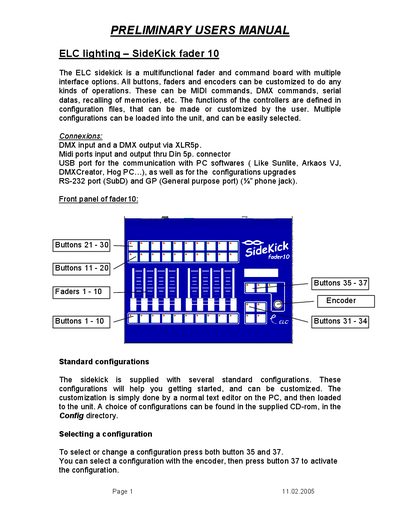
The ELC SideKick fader 10 is a multifunctional controller featuring buttons, faders, and encoders that can be customized for various operations including MIDI and DMX commands. It supports multiple interface options such as DMX input/output via XLR5p, MIDI via Din 5p, USB for PC software communication, and RS-232/General Purpose ports.
The device comes with several standard configurations that can be customized using text editors on a PC. Users can select and activate these configurations by pressing specific buttons and using the encoder. Examples provided include the Universal Wing for memory playback, grandMA DMX Wing configurations for controlling executor faders, and hog2PC/Sunlite MIDIwing setups for integrating with PC software.
| DMX Interface | DMX input and a DMX output via XLR5p |
|---|---|
| MIDI Interface | Midi ports input and output thru Din 5p connector |
| USB Interface | USB port for the communication with PC softwares |
| RS-232 Interface | RS-232 port (SubD) |
| General Purpose Port | GP (General purpose port) (%% phone jack) |
| Faders | Faders 1 - 10 |
| Buttons | Buttons 1 - 10 Buttons 31 - 34 |
To select or change a configuration, press both button 35 and 37, then use the encoder to select and press button 37 to activate.
Press and hold button 31, then press button 1 to 10 to select the memory.
In the hog2PC configuration, Fader 1 acts as the master fader.