
Yamaha Electone Footswitches Knee Lever and Expression Pedals Manual


Yamaha Electone Footswitches Knee Lever and Expression Pedals Manual - cover page
Brand
Yamaha
Category
Musical instruments
Document type
User Manual
Language
English
Pages
28
File format
PDF
File size
1.6 MB
Published
12 June, 2012
Updated
12 June, 2012
MD5 checksum
42BD63A7C35471DE320AA6EF7F8494E1

About this manual

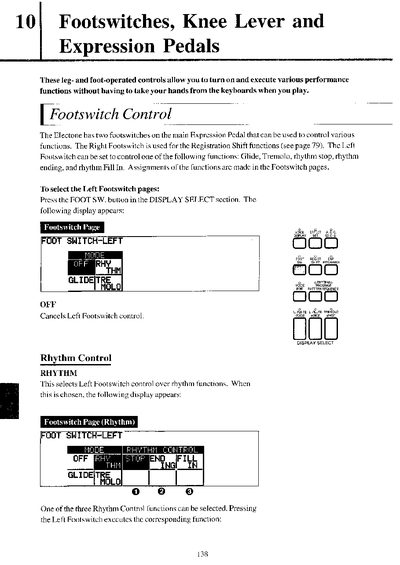
The document details the operation of the Right and Left Footswitches on the main Expression Pedal. The Right Footswitch controls Registration Shift functions, while the Left Footswitch can be assigned to control Glide, Tremolo, or various Rhythm Control functions like Stop, Ending, and Fill In. Users can configure these assignments via the Footswitch pages in the display.

What's inside

  • Footswitch Control
  • Rhythm Control
  • Glide Function
  • Tremolo Control
  • Knee Lever
  • Melody On Chord
  • Lead Slide
  • Expression Pedals
  • Pitch Bend
  • Rhythm Tempo

Specifications

Default Pitch Setting440.0 Hz
Transpose Range-6 ~ +6 semitones
Fine Pitch Range438.8 ~ 444.5 Hz
Rhythm Tempo Range50% ~ 200%

Frequently asked questions

What does the Right Footswitch control?

The Right Footswitch is used for the Registration Shift functions.

How do you use the Knee Lever for Sustain?

Fold the Knee Lever down and press it to the right with your knee to activate the sustain effect.

Download PDF (1.6 MB)

More Yamaha Manuals


View all Yamaha manuals →