
This document is a quick operation guide for the NP-30/YNP-25 digital piano. The digital piano features multiple voices, reverb types, metronome settings, and volume adjustments. It also supports dual octave setting, touch sensitivity adjustment, and voice demonstration.
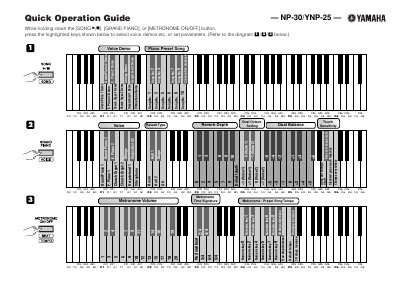
The document serves as a Quick Operation Guide for the Yamaha NP-30 and YNP-25 digital pianos. It details specific key combinations required to access various functions while holding down primary buttons such as [SONG >All], [GRAND PIANO], or [METRONOME ON/OFF].
The guide covers procedures for selecting voice demos (e.g., Grand Piano, Harpsichord), configuring the metronome volume and tempo, and adjusting pitch in cent steps. It also provides instructions for changing MIDI transmit/receive channels and transposing.
While holding down the [SONG >All], [GRAND PIANO], or [METRONOME ON/OFF] button, press the highlighted keys shown in the diagram.
Press specific numeric keys while holding down the [SONG >All] and [GRAND PIANO] buttons to increase or decrease the tempo.