
NEC VT770 Projector Quick Start Guide

This file is a manual of NEC Viewtechnology, Ltd.'s 7N8P4101, introducing the features and characteristics of the product.
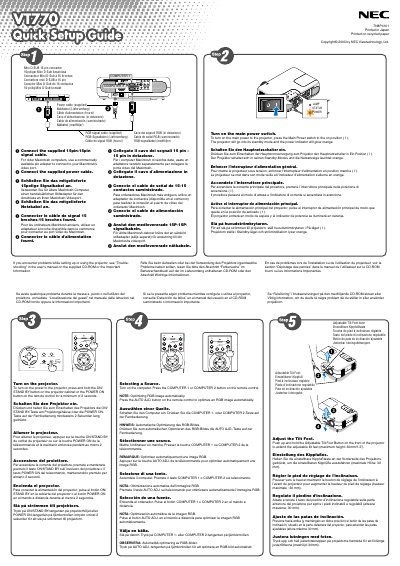

NEC VT770 Projector Quick Start Guide - cover page
Brand
NEC
Category
Other Electronics
Document type
Quick Start Guide
Language
English
Pages
2
File format
PDF
File size
923 KB
Published
10 May, 2012
Updated
30 September, 2023
Model
VT770
MD5 checksum
8FEFF12CF512910BA63CEA2D235F6441

About this manual

This Quick Start Guide explains how to install and operate the NEC VT770 projector. It includes instructions for connecting power and signal cables, turning the unit on, and selecting a video source.

The guide also describes how to adjust the adjustable tilt foot, use the zoom and focus rings, and correct trapezoidal distortion with both automatic and manual keystone functions.

What's inside

  • Power On Procedure
  • Cable Connections
  • Source Selection
  • Adjustable Tilt Foot
  • Zoom and Focus Adjustment
  • Auto Keystone Correction
  • Manual Keystone Correction
  • Troubleshooting Reference

Specifications

Maximum Tilt Foot Height30 mm

Frequently asked questions

How do I turn on the NEC VT770 projector?

Press and hold the ON/STAND BY button on the projector cabinet or the POWER ON button on the remote control for at least 2 seconds.

Download PDF (923 KB)

More NEC Manuals


View all NEC manuals →