
This manual introduces how to install Dopod S300 SIM card, dial a phone number and set ringtone.
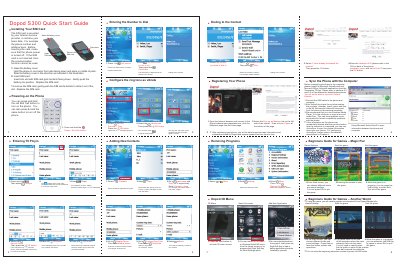
The Dopod S300 Quick Start Guide provides step‑by‑step instructions for getting the phone up and running. It explains how to open the battery cover, insert the SIM card with the gold contacts facing down, and power the device on or off by holding the red End/Call button.
Additional sections cover basic phone functions such as dialing numbers, setting the ring mode, adding new contacts, registering the phone on the Dopod website, and syncing data with a computer using Microsoft ActiveSync. The guide also includes brief notes on using pre‑installed games and managing applications. This manual is written in Chinese.
Press and hold the red End/Call button to turn the phone on; press and hold the same button again to turn it off.