
This manual introduces the use and precautions of Yamaha Silent Brass Personal Studio ST9.
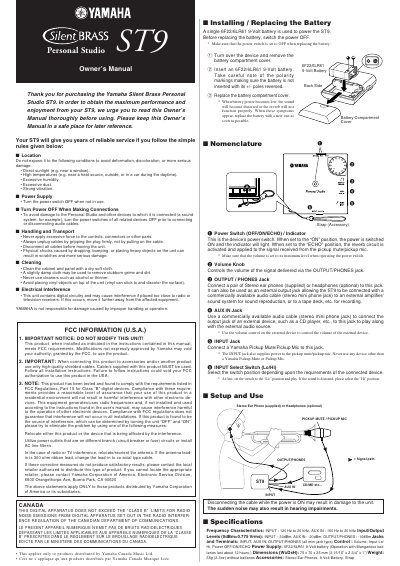
This manual explains safe handling, transport, cleaning, and storage of the Yamaha ST9, including warnings about sunlight, temperature, humidity, dust, vibration, and electrical interference. It also details power‑on/off procedures, battery replacement, and the functions of the power switch (OFF/ON/ECHO).
The guide describes all connectors (INPUT, AUX IN, OUTPUT/PHONES), control knobs, input‑select switch, and how to connect headphones, external audio sources, and Yamaha pickup devices. A specifications section lists frequency response, input/output levels, dimensions, weight, power supply, and included accessories.
| Frequency Characteristics | INPUT 120 Hz‑20 kHz, AUX IN 160 Hz‑20 kHz |
|---|---|
| Input/Output Levels (0 dBm = 0.775 V rms) | INPUT –30 dBm, AUX IN –20 dBm, OUTPUT/PHONES –10 dBm |
| Jacks and Terminals | INPUT, AUX IN, OUTPUT/PHONES (mini‑jack type) |
| Controls | Volume, Input Lo/Hi, Power OFF/ON/ECHO |
| Power Supply | 6F22/6LR61 9‑Volt battery (≈12 h operation) |
| Dimensions (W×D×H) | 75 mm × 70 mm × 25 mm |
| Weight | 65 g (2.3 oz) without batteries |
| Accessories | Stereo ear‑phones, 9‑Volt battery, strap |
Turn the power switch OFF, open the battery compartment cover, insert a 6F22/6LR61 9‑Volt battery with correct polarity, and replace the cover.
The INPUT jack covers 120 Hz to 20 kHz, while the AUX IN jack covers 160 Hz to 20 kHz.
When set to ECHO, the reverb circuit is activated and applied to the signal from the pickup mute/mic.
Place the unit away from radio or television receivers, use separate power outlets, or install an AC line filter if interference occurs.