
Nokia 3120 User Manual

This document is a user guide that includes features and instructions for the NOKIA 3120 and NOKIA 6610 mobile phones.
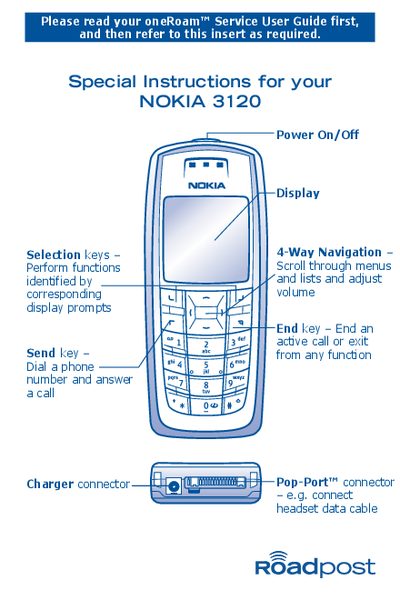

Nokia 3120 User Manual - cover page
Brand
Nokia
Category
Cell Phones
Document type
User Manual
Language
English
Pages
4
File format
PDF
File size
130 KB
Published
02 May, 2012
Updated
29 September, 2023
MD5 checksum
764FA7CBD01F8B62A8AC7A5FC49BD2F1

About this manual

This manual provides step‑by‑step instructions for operating the Nokia 3120 mobile phone. It covers powering the device on and off, answering and ending calls, using voicemail, and locking or unlocking the keypad.

Additional sections describe how to send and receive text messages, create email messages from the phone, change network selection, and access troubleshooting tips when problems arise.

What's inside

  • Special Instructions for your NOKIA 3120
  • General Instructions
  • Powering On Your Phone
  • Answering Calls
  • Voicemail Access
  • Changing Band Frequency
  • Locking Your Phone's Keypad
  • Text Messaging Instructions
  • Sending Text Messages to another cellular phone
  • Sending Text Messages to an email address

Specifications

Connector typePop‑Port™
Charger connector4‑pin

Frequently asked questions

How do I turn the Nokia 3120 on and off?

Press and hold the <@> key located at the top of the phone to power it on or off.

How do I answer an incoming call?

Press the key to answer the call.

How do I access voicemail?

Press and hold the <1> key to access your voicemail.

Download PDF (130 KB)

More Nokia Manuals


View all Nokia manuals →