
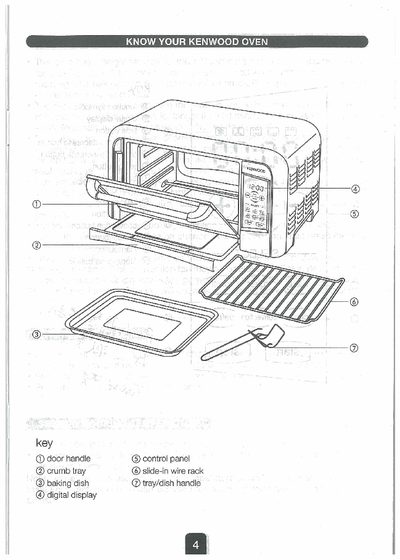
This manual covers the operation of the Kenwood MO716 oven, describing the control panel layout, how to set the clock, select cooking functions, and adjust temperature and time. It also explains the use of convection, defrost, bake, toast, and broil modes, as well as how to change functions and pause cooking.
Additional sections provide cleaning instructions, safety notes, and service and customer‑care details, including warranty and repair information.
| Maximum timer setting | 99 minutes |
|---|---|
| Height settings for trays | 2 positions |
| Display units | Celsius or Fahrenheit selectable |
| Convection fan operation | Available on Bake, Broil, Toast |
Press the clock key and use the + or – buttons to adjust the hour and minute, then press the clock key again to set it.
Select the defrost function, insert the tray, set a time between 1 and 99 minutes, and press start; the temperature is fixed and cannot be adjusted.