
This document is a simple instruction manual for the LIGHT POOL phone, which mainly introduces the power on/off, language switching, dialing/receiving calls, saving/viewing phonebooks, and using the camera.
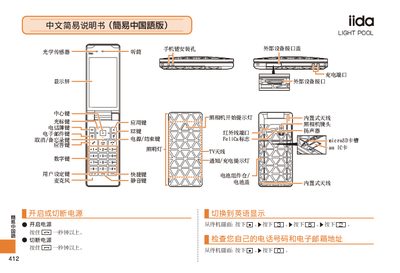
This manual explains how to operate the iida LIGHT POOL phone. It includes instructions for powering the device on and off, making and ending calls, and managing contacts.
Additional sections cover using the built‑in camera for photos and videos, setting mute mode, recording voice memos, and contacting customer support. This manual is written in Chinese.
From the standby screen, enter the phone number and press the call button.
From the standby screen, hold the save key for about one second, then follow the prompts to enter the contact details.