
Key facts
- Manuals
- 4
- Categories
- 1
- Languages
- ZH
- Last added
- 2012-03-27
Featured iida manuals
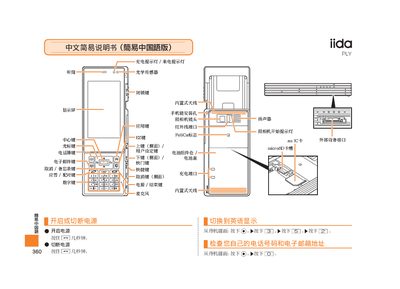
iida PLY Phone User Manual
This manual explains how to power the iida PLY phone on and off, make and receive calls, manage contacts, and use the built‑in camera for photos and video. It also describes how to adjust volume, mute the device, and record voice memos.
Additional sections cover the function of each key, the charging and incoming‑call indicator lights, and how to switch between photo and animation modes. Contact information for customer service is provided at the end. This manual is written in Chinese.
Covers: Power On/Off · Making Calls · Answering Calls · Saving Contacts · Viewing Contacts · Camera Operation
Latest iida manuals
iida LIGHT POOL phone Manual
This document is a simple instruction manual for the LIGHT POOL phone, which mainly introduces the power on/off, language switching, dialing/receiving calls, saving/viewing phonebooks, and using the camera.
iida G11 phone Manual
This document is a Chinese simplified instruction manual, which introduces the features and characteristics of a product called G11, including functions such as receiver, optical sensor, display screen, camera, etc.
iida INFOBAR AO1 phone Manual
This document introduces some operation methods and functions on iida Home, including power on/off, language settings, making phone calls, saving contacts, shooting videos and photos, etc. It also provides some commonly used phone numbers and contact information.
iida PLY Phone User Manual
User Manual 2 pages · 237 KB · ZHChinese user manual for the iida PLY phone, covering basic operation, calling, contacts, camera, and settings.
Which document do I need?
User Manual
Day-to-day operation, settings and troubleshooting. Start here if the product is already set up.
Questions answered in iida manuals
How do I make a call?
From the standby screen, enter the phone number and press the [LC] key.
How do I answer an incoming call?
When the phone rings, press the answer key to answer.