
This document is the A31 phone manual, which introduces the functions, operation methods and precautions of the phone.
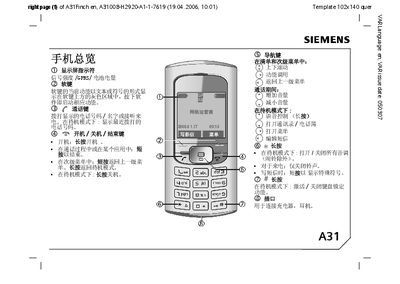
This manual covers safety precautions, battery handling, SIM card installation, PIN and password settings, and general usage guidelines for the Siemens A31 mobile phone. It also includes instructions for charging, protecting the device, and maintaining optimal performance.
The guide details the phone’s features such as the address book, SMS/MMS messaging, T9 input, voice dialing, internet browsing, multimedia playback, and calendar functions. Technical specifications, warranty information, and service contacts are provided at the end of the document.
| Dimensions | 102 x 46 x 17.6 mm |
|---|---|
| Battery voltage | 3.0 V or 1.8 V |
| Talk time | up to 300 minutes |
| Standby time | up to 270 hours |
| Operating temperature | -10 °C to +55 °C |
| Frequency band | 880‑960 MHz |
| Frequency band | 1710‑1880 MHz |
You can disable the PIN code at startup, or change it via the PIN settings menu.
The address book can store up to 500 entries.
English SMS can contain up to 760 characters and Chinese SMS up to 330 characters.
Charging for at least 2 hours will fully charge the battery.