
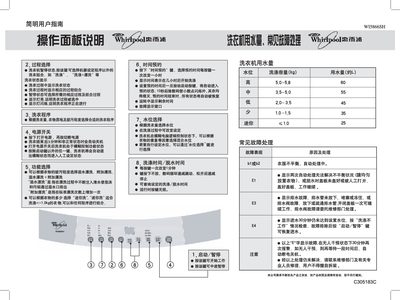
This guide explains the control panel functions, how to choose washing programs, set water levels, and use additional features such as mini‑wash and time reservation. It also details the start‑up sequence, loading instructions, and how to adjust wash and spin times.
The manual includes a table of program durations, water‑use information, and a troubleshooting section that describes fault indicators, drainage problems, and steps to take when the machine stops unexpectedly. This manual is written in Chinese.
| Rated Voltage | 220 V |
|---|---|
| Rated Frequency | 50 Hz |
| Rated Input Power | 400 W |
| Wash/Spin Capacity | 5.8 kg |
| Overall Dimensions | 547 mm × 559 mm × 936 mm |
| Cabinet Dimensions | 540 mm × 540 mm |
| Inlet Water Pressure | 0.02‑0.78 MPa |
Press the power switch, then press the “启动/暂停” key to begin the wash cycle.
A flashing 225 indicates that the current washing process is running.
Use the “时间预约” key to select the desired reservation time before starting the wash.
If the “FE” fault appears, wait 30 minutes; if the fault persists, contact the service department.