
This is a user manual for a laptop computer, which includes the introduction of the whole machine, getting started, BIOS settings, software installation, power system, simple troubleshooting and other contents.
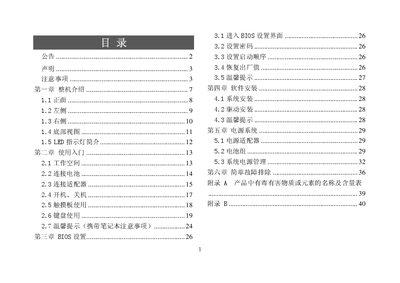
This manual covers the basic usage of the GreatWall notebook, including workspace setup, battery and adapter connection, power on/off, touchpad and keyboard operation, and important safety reminders. It also explains how to enter and configure the BIOS, install the operating system and drivers, and manage power settings.
Additional sections describe the power system, simple fault troubleshooting, environmental precautions, cleaning procedures, battery handling, and warranty information. Contact details for authorized service centers and the company website are provided at the end. This manual is written in Chinese.
| Supported Operating Systems | Linux, Windows XP |
|---|
Press and hold the power button for more than four seconds to force a shutdown.
Shut down the computer, unplug the power cord, and remove the battery before cleaning.
No, you must not use a power adapter that is not supplied with the product.