
Lenovo LJ3600D/LJ3650DN printer quick installation guide, including the printer's components, installation steps, precautions and other contents.
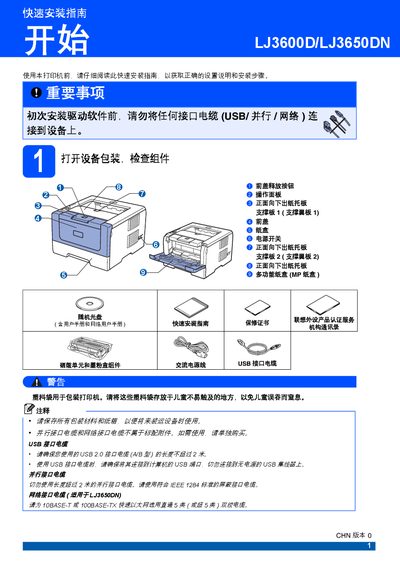
The guide walks users through unpacking the printer, checking components, and safety warnings before any cables are connected. It details how to install the toner and drum unit, load paper, and configure optional accessories.
It also explains connecting the printer via USB, parallel, or network cables after driver installation, printing a test page, and lists optional accessories such as a low‑position paper tray and memory module. This manual is written in Chinese.
| Low‑position paper tray capacity | 250 sheets |
|---|---|
| Total paper capacity with low tray | 550 sheets |
| Memory module type | 144‑pin SO‑DIMM |
No. The guide states you must not connect any interface cable (USB, parallel, or network) before installing the driver.
Turn on the printer, wait for the status light to turn green, then press the Go button to print a test page.