
This document is the user manual for Polar RS200 TM and Polar RS200sd TM, which provides instructions on how to use and the features of these two running sport heart rate monitors.
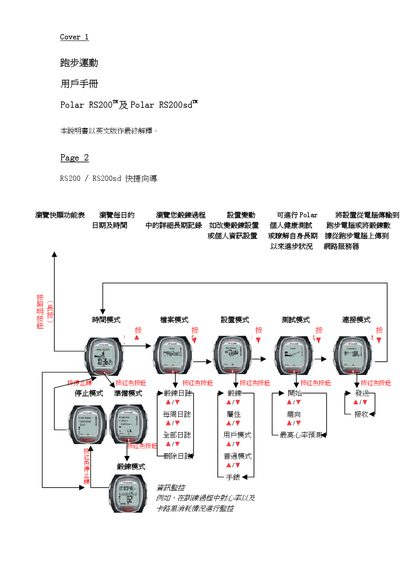
The Polar RS200/RS200sd jogging computers are portable running devices that record distance, speed, heart‑rate and other training data. This manual explains how to set up the device, configure personal settings, and use its functions such as heart‑rate monitoring and data transfer to a computer.
It also provides instructions for adjusting time, date, units, locking keys, and details about warranty, service and troubleshooting common issues. This manual is written in Chinese.
Wear the heart‑rate transmission belt and ensure the electrodes are moist; the device will automatically start measuring heart‑rate when the belt is correctly positioned.
Press the Y key (or the corresponding button) to adjust the time values, then use the same key to set month/day, year, and AM/PM as needed.
Yes, the button‑lock function can be activated, which disables the keys until the lock is released.