
This document provides instructions and precautions for installing Gigabyte water cooling system, including checking the tightness of water pipe joints, ensuring sufficient water level in the tank, and the need for additional water cooling liquid. It also lists the accessories included and provides an installation diagram.
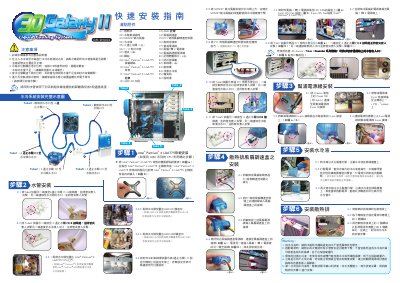
The document explains the precautions and safety measures required before installing the GALAHY2 liquid cooling system, including checking all tube connections, confirming clamp positions, and using only Gigabyte‑branded coolant. It also describes the low‑water level indicator that flashes a red LED on the PCB and the automatic shutdown that occurs after four seconds of insufficient water.
Detailed installation instructions cover tube routing, pump power cable connections, radiator fan and fan‑speed controller mounting, and filling the reservoir with Gigabyte liquid. The manual ends with final mounting steps for the radiator and a checklist of required accessories. This manual is written in Chinese.
| Low water level indicator | Red LED on PCB flashes when water is low |
|---|---|
| Automatic shutdown delay | System shuts off 4 seconds after low water detection |
| Tube diameter | 1/2 inch |
The PCB at the bottom of the water tank flashes a red LED to alert the user when the water level is low.
Only Gigabyte‑branded liquid cooling fluid should be used; using other fluids voids the warranty.
Connect the 2‑pin male connector of the pump power cable to the “+PW-” jumper on the motherboard, then attach the 6‑pin connector to the socket on the back of the water tank.