
Key facts
- Manuals
- 4
- Categories
- 1
- Languages
- EN · ZH
- Last added
- 2012-02-18
Featured 3D manuals
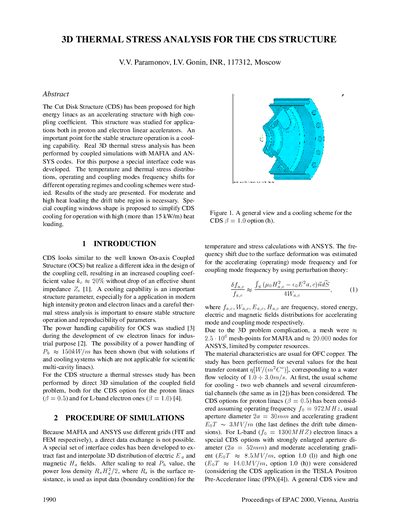
3D Thermal Stress Analysis for the CDS Structure
The paper describes a 3‑D thermal‑stress analysis of the Cut Disk Structure (CDS), an accelerating structure proposed for high‑energy proton and electron linacs. Using coupled MAFIA and ANSYS simulations, the authors evaluate temperature distributions, thermal stresses, and frequency shifts for various cooling schemes and heat‑loading conditions.
Results show that web‑channel cooling is required for moderate to high heat loads, while a simple scheme with two straight web channels suffices for loads up to about 10 kW/m. For heat loads above 20 kW/m, a circular drift‑tube channel and smooth coupling windows are recommended to keep stresses below the yield strength of OFHC copper.
Covers: Abstract · 1 INTRODUCTION · 2 PROCEDURE OF SIMULATIONS · 3 THERMAL STRESS ANALYSIS · 4 CONCLUSION · REFERENCES
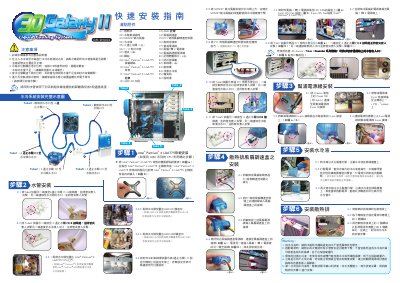
3D GALAHY2 LIQUID COOLING SYSTEM quick installation Service Manual
The document explains the precautions and safety measures required before installing the GALAHY2 liquid cooling system, including checking all tube connections, confirming clamp positions, and using only Gigabyte‑branded coolant. It also describes the low‑water level indicator that flashes a red LED on the PCB and the automatic shutdown that occurs after four seconds of insufficient water.
Detailed installation instructions cover tube routing, pump power cable connections, radiator fan and fan‑speed controller mounting, and filling the reservoir with Gigabyte liquid. The manual ends with final mounting steps for the radiator and a checklist of required accessories. This manual is written in Chinese.
Covers: Precautions · Parts List · Tube Installation · Pump Power Cable Installation · Radiator Fan Installation · Filling the Reservoir
Gigabyte 3D Galaxy II GH-WIU02 User Manual
This manual covers the complete setup of the Gigabyte 3D Galaxy II water‑cooling system, including a detailed parts list, specifications, and step‑by‑step installation instructions for the radiator, pump, tubes, and 4‑way shut‑off valve. Safety precautions and warranty exclusions are also explained.
Additional sections describe how to fill and test the coolant, perform reverse‑installation for maintenance, and configure the shut‑off valve for CPU, GPU, or chipset cooling. The guide includes diagrams of tube routing and connector locations to aid proper assembly. This manual is written in Chinese.
Covers: 清點附件 · 規格介紹 · 特色彙總 · 水冷系統安裝步驟 · 水冷液的安裝及測試 · 水冷系統反安裝
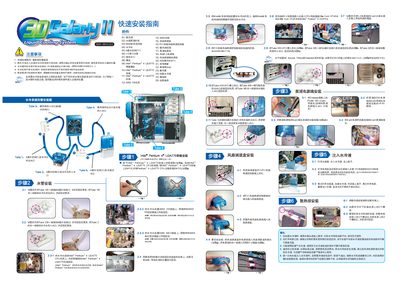
3D GALAHY2 quick installation Service Manual
This guide provides the complete installation procedure for Gigabyte's water‑cooling system, including required accessories, tube routing, and connection of power cables. It also outlines the precautions to take before and after filling the coolant.
The document details how to secure tubes with clamps, attach the cooling head to various CPU sockets, connect the pump and fan power lines, and verify the water‑level indicator. It finishes with instructions for filling the coolant, testing the system, and handling low‑water warnings. This manual is written in Chinese.
Covers: Precautions · Accessories List · Tube Connections · Installation Steps · Power Connections · Water Filling Procedure
Latest 3D manuals
3D Thermal Stress Analysis for the CDS Structure
Other 3 pages · 367 KB · ENA conference paper presenting 3‑D thermal‑stress simulations of the Cut Disk Structure (CDS) for high‑energy linacs.
3D GALAHY2 LIQUID COOLING SYSTEM quick installation Service Manual
Service Manual 1 pages · 4.7 MB · ZHThis service manual provides installation steps, safety warnings, and a parts list for the Gigabyte GALAHY2 liquid cooling system.
Gigabyte 3D Galaxy II GH-WIU02 User Manual
User Manual 24 pages · ZHThe Gigabyte 3D Galaxy II GH-WIU02 water‑cooling system user manual provides installation, operation, and warranty information.
3D GALAHY2 quick installation Service Manual
Installation Guide 1 pages · 5.1 MB · ZHStep‑by‑step installation guide for Gigabyte water‑cooling system with safety warnings and wiring details.
Which document do I need?
Service Manual
Disassembly, diagnostics and part numbers, for repair.
User Manual
Day-to-day operation, settings and troubleshooting. Start here if the product is already set up.
Installation Guide
Mounting, wiring and first power-up. Read it before the hardware goes in.
Questions answered in 3D manuals
How does the system warn of low water level?
The PCB at the bottom of the water tank flashes a red LED to alert the user when the water level is low.
From: 3D GALAHY2 LIQUID COOLING SYSTEM quick installation Service Manual
What coolant should be used with the GALAHY2 system?
Only Gigabyte‑branded liquid cooling fluid should be used; using other fluids voids the warranty.
From: 3D GALAHY2 LIQUID COOLING SYSTEM quick installation Service Manual
What must be checked before injecting coolant into the system?
All water‑pipe connections must be tightly inserted and the clamp positions must be correct.
Which coolant should be used with this system?
Only Gigabyte‑branded coolant should be used; using other liquids voids the warranty.
How can I tell the water level is low?
When the water level falls below the low‑water line, the red LED on the PCB flashes.
What does the system do if the water level is low?
The system automatically shuts down within four seconds after detecting insufficient water.