
This document introduces the user manual of the IS-2048 security image intercom system. The system uses a microchip as its core and has basic functions such as intercom calling, intelligent melody ringtone, eco-friendly ringtone, and message indicator light. It also has emergency functions and can be used in buildings, villa-type residences, or other places that require intercom devices.
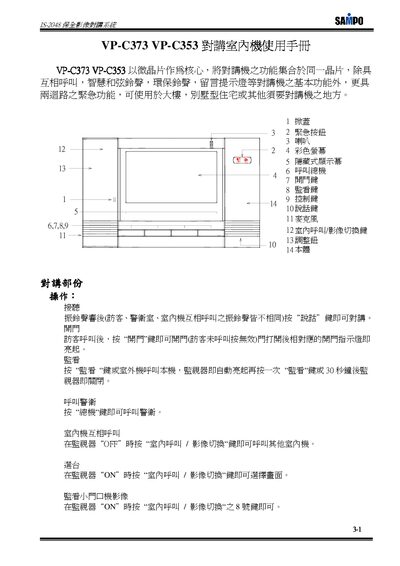
This manual provides step‑by‑step instructions for using the IS VP‑C373 and VP‑C353 indoor intercom units. It explains how to answer calls, open doors, monitor video, and activate emergency or security functions.
The document also details configuration procedures such as setting passwords, adjusting security zones, and connecting external devices with the provided wiring diagrams. This manual is written in Chinese.
| Emergency function loops | 2 |
|---|---|
| Security function loops | 6 |
| Hidden display | Yes |
Press the talk key when the ring tone sounds to start the intercom conversation.
After a visitor calls, press the open door key; the door will unlock and the indicator light will turn on.
Press the emergency key to transmit a rescue signal to the central unit.
Press the monitor key to immediately stop the alarm tone.