
This document is a user manual for Dell™ Dimension™ 3100/E310 computer. It provides detailed information about the hardware configuration and features of the computer.
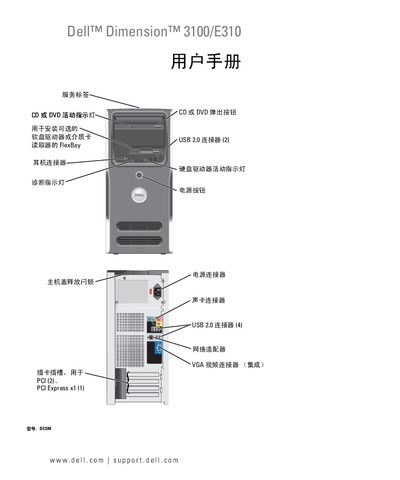
This manual covers the complete setup and use of the Dell Dimension 3100/E310 desktop, including installing the operating system, connecting peripherals, and configuring network and power settings. It also details hardware components such as hard drives, CD/DVD drives, floppy drives, and memory modules.
Additional sections provide advanced troubleshooting, diagnostic tools, RAID configuration, and guidance for restoring the system or clearing BIOS passwords. An index at the end helps locate specific topics quickly. This manual is written in Chinese.
Follow the instructions in the manual to install the hard drive, which are listed under the hardware installation section.
The manual explains the procedure to clear a forgotten BIOS password in the troubleshooting section.