
Key facts
- Manuals
- 100
- Models
- 25
- Categories
- 6
- Languages
- ZH
- Last added
- 2012-05-09
Kyocera models by category
Featured Kyocera manuals
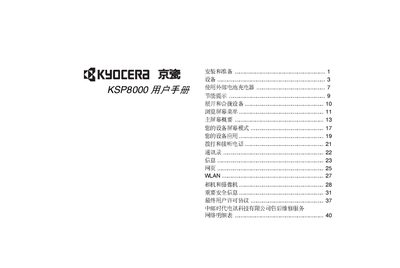
Kyocera KSP8000 User Manual
This manual provides step‑by‑step instructions for installing the KSP8000, inserting the UIM card and battery, and using the device’s functions such as calls, contacts, messaging, web browsing, WLAN, camera, and media playback. It also covers safety warnings, energy‑saving tips, and the end‑user license agreement.
Key sections include installation and preparation, external battery charger usage, screen navigation, main screen overview, screen modes, applications, and detailed descriptions of hardware buttons, ports, and status indicators. This manual is written in Chinese.
Covers: Installation and Preparation · Using External Battery Charger · Energy Saving Tips · Screen Navigation and Main Screen Overview · Making and Receiving Calls · Contacts and Messages
Latest Kyocera manuals
KYOCERA KM-3050 KM-4050 KM-5050 Operation Guide
This is an operation guide for a printer, which includes the usage, maintenance and troubleshooting methods of the machine
Kyocera KR1 Mobile Router User Guide
This document is the Kyocera KR1 Mobile Router User Guide, introduces the features and characteristics of the product
KYOCERA KHS057QV1CJ-G01 handbook
This document is a warning for the use of Kyocera LCD modules.
KYOCERA - Caution 1. This Kyocera LCD module has been specifically designed for use only in electronic devices
This document provides information on the usage restrictions and liability disclaimer for Kyocera LCD modules, as well as the responsibilities that customers need to assume when using these modules. The modules are designed for use in electronic devices in the areas of audio control, office automation, industrial control, home appliances, etc. They should not be used in applications where module failure could result in physical harm or loss of life, and Kyocera expressly disclaims any and all liability relating to the use of the module in such applications.
KYOCERA KCG057QVLDG-G77
Kyocera LCD module is specifically designed for use only in electronic devices in the areas of audio control, office automation, industrial control, home appliances, etc. The modules should not be used in applications where module failure could result in physical harm or loss of life.
KYOCERA TCG057VGLBA-G00 Manual
This document describes the application, construction and outline, mechanical specifications, absolute maximum ratings, electrical characteristics, optical characteristics, interface signals, input timing characteristics, LED backlight characteristics, lot number identification, warranty, precautions for use, reliability test data, and outline drawing of the 5.7 inch VGA transmissive color TFT with LED backlight, model TCG057VGLBA-G00.
KYOCERA TCG104VG2AA-G00 Manual
This document provides information on the safe use of Kyocera LCD modules.
KYOCERA KCG057QVLDG-G000 Manual
This document is the specification of KCG057QVLDG-G000 model liquid crystal module
KYOCERA - Spec No. TQ3C-8EAF0-E1DDE81-00 áSPEC Date September 8 2007 TYPE : TCG057QVLBA-G00
The document is a specification for the TCG057QVLBA-G00 5.7 inch QVGA transmissive color TFT display with LED backlight produced by KYOCERA CORPORATION KAGOSHIMA HAYATO PLANT LCD DIVISION. The document includes the application, construction and outline, mechanical specifications, absolute maximum ratings, electrical characteristics, optical characteristics, interface signals, input timing characteristics, LED backlight characteristics, lot number identification, warranty, precautions for use, reliability test data, and outline drawing of the display.
KYOCERA FS-C5020N FS-C5030N basic Operating Manual
This is the basic operation manual for Canon FS-C5020N FS-C5030N, which introduces the installation, use, maintenance, troubleshooting and other contents of the product.
KYOCERA FS-1024MFP/1124MFP Installation Guide
KYOCERA FS-1124MFPFax Manual
This is a summary of the FS-1124MFP fax machine user manual, introducing the functions and features of the fax machine.
KYOCERA KM-1635/2035/1648 Manual
KM-1635 KM-2035 KM-1648 User's Manual
KyOCERa TASKalfa 620/820 Manual
This is an advanced operation manual for the TASKalfa 620/820 copier, which introduces the copier's various copying functions, including automatic paper selection, displacement mode, multiple-in-one mode, binding edge mode, centering originals, trimming, inserting page numbers, cover mode, watermark overlay, booklet making, book copying, annotation blank mode, continuous scanning, test copy mode, repeat copy, slide film underlay, automatic image rotation, economy print mode, reverse copy, mirroring, mixed originals mode, multi-page table and program copy.
KyOCERa TASKalfa 420i/520i Manual
This is the TASKalfa 420i/520i user manual, which introduces how to load paper, basic copying, printing and scanning operations and troubleshooting.
Which document do I need?
User Manual
Day-to-day operation, settings and troubleshooting. Start here if the product is already set up.
Questions answered in Kyocera manuals
How do I turn on the KSP8000?
Press and hold the power button to open the device.
How do I insert the UIM card?
Open the back cover, insert the UIM card into the slot with the notch positioned at the upper left, and close the cover.