
Key facts
- Manuals
- 12
- Languages
- EN
- Last added
- 2026-10-13
Featured PHILIPS Respironics manuals
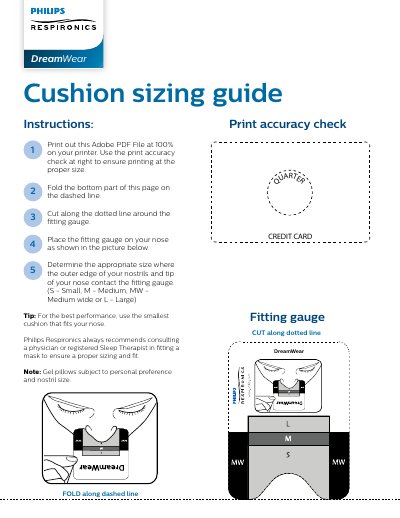
Philips Respironics Cushion Sizing Guide User Instructions
This document provides instructions on how to use a printable cushion sizing guide to select the appropriate mask size. Users are directed to print the PDF at 100% scale, verify accuracy using an included check pattern, and fold and cut the page along specific lines to create a fitting gauge.
Covers: Print out this Adobe PDF File · Use the print accuracy check · Fold the bottom part of this page · Cut along the dotted line · Place the fitting gauge on your nose · Determine the appropriate size
Philips Respironics DreamStation 2 CPAP Advanced Auto CPAP Advanced User Manual
This user manual provides instructions for setting up, operating, and maintaining the Philips Respironics DreamStation 2 CPAP Advanced Auto CPAP Advanced device. It includes safety information, system overview, device setup, troubleshooting, connectivity, accessories, cleaning, and technical specifications. The device delivers positive airway pressure therapy for obstructive sleep apnea and must be used under physician supervision with approved accessories.
The manual also covers safety precautions, such as proper placement of the device, handling of oxygen, cleaning procedures, and warnings for specific patient conditions. It includes sections on Bluetooth connectivity, troubleshooting pop-up messages, and technical specifications including environmental, electrical, and humidity parameters.
Covers: Safety Information · System Overview · Device Setup · Pop-up Messages and Troubleshooting · Connectivity · Accessories
Philips Respironics CoughAssist E70 User Manual
The Philips Respironics CoughAssist E70 is a medical device designed to assist patients in loosening, mobilizing, and clearing secretions. It achieves this by providing high-frequency oscillatory vibrations while gradually applying positive pressure to the airway, followed by a rapid shift to negative pressure. The device is intended for use with facemasks, mouthpieces, or adapters for endotracheal and tracheostomy tubes in both hospital and home environments.
Covers: Introduction · Therapy Modes and Features · Device Setup · Viewing and Changing Settings · Cleaning and Maintenance · Accessories
Philips Respironics DreamStation BiPAP autoSV Provider Guide
This document is a Provider Guide for the Philips Respironics DreamStation BiPAP autoSV. It instructs medical professionals on how to unlock the device to access and modify settings that are restricted for standard users. Accessing Provider mode requires holding the control dial and Ramp button for at least 5 seconds while the device is powered.
Once in Provider mode, the guide describes various screens for adjusting therapy parameters such as Opti-Start, Max Pressure, EPAP, and Pressure Support (PS). It also covers alarm configurations for patient disconnect, apnea, and low minute ventilation, as well as comfort settings including humidification, SmartRamp, Flex, and mask type resistance control.
Covers: Accessing Provider mode · Therapy Settings · Alarm settings · Comfort settings · Humidification · SmartRamp
Latest PHILIPS Respironics manuals
Philips Respironics Cushion Sizing Guide User Instructions
User Manual 1 pages · 115 KB · ENInstructions for printing, cutting, and using a sizing gauge to determine the correct size of Philips Respironics Dream Wear nasal or full face masks.
Philips Respironics DreamStation 2 CPAP Advanced Auto CPAP Advanced User Manual
User Manual 68 pages · 1.8 MB · ENUser manual for Philips Respironics DreamStation 2 CPAP Advanced Auto CPAP Advanced, covering setup, safety, troubleshooting, and maintenance.
Philips Respironics CoughAssist E70 User Manual
User Manual 55 pages · 2.6 MB · ENUser manual for the Philips Respironics CoughAssist E70 device, covering setup, therapy modes, settings, cleaning, and troubleshooting for home care providers.
Philips Respironics DreamStation BiPAP autoSV Provider Guide
Service Manual 74 pages · 3.1 MB · ENThis provider guide details how to access and adjust advanced therapy settings, alarms, and comfort features on the DreamStation BiPAP autoSV device.
Philips Respironics DreamStation BiPAP Pro Auto BiPAP User Manual
User Manual 36 pages · 3 MB · ENThis user manual provides instructions for the installation, operation, and maintenance of the Philips Respironics DreamStation BiPAP Pro Auto BiPAP system…
Philips Respironics BiPAP Auto Bi-Flex User Manual
User Manual 28 pages · 388 KB · ENThis manual provides operating instructions, safety warnings, and maintenance guidelines for the Philips Respironics BiPAP Auto Bi-Flex positive airway…
Philips Respironics DreamStation CPAP CPAP Pro Auto CPAP User Manual
User Manual 36 pages · 2.9 MB · ENUser manual for Philips Respironics DreamStation CPAP systems, covering setup, operation, safety warnings, and maintenance.
Philips Respironics DreamStation CPAP User Manual
User Manual 32 pages · 2.2 MB · ENUser manual for Philips Respironics DreamStation CPAP, covering setup, operation, safety, and troubleshooting for home sleep apnea therapy.
Philips Respironics REMstar Auto A-Flex User Manual
User Manual 28 pages · 405 KB · ENUser manual for Philips Respironics REMstar Auto A-Flex, a home sleep apnea therapy device with Auto-CPAP and C-Flex modes.
Philips Respironics System One Heated Humidifier User Manual
User Manual 20 pages · 1.9 MB · ENUser manual for Philips Respironics System One Heated Humidifier, covering setup, daily use, cleaning, and troubleshooting for home and hospital use.
Philips Respironics DreamStation Heated Humidifier User Manual
User Manual 24 pages · 4.1 MB · ENUser manual for the Philips Respironics DreamStation Heated Humidifier, covering setup, cleaning, safety, and compatibility with therapy devices.
Philips Respironics EverFlo Q Oxygen Concentrator Service & Technical Reference Manual
Service Manual 108 pages · 6.8 MB · ENThis service manual provides technical information, maintenance procedures, troubleshooting guides, and repair instructions for the Philips Respironics…
Which document do I need?
User Manual
Day-to-day operation, settings and troubleshooting. Start here if the product is already set up.
Service Manual
Disassembly, diagnostics and part numbers, for repair.
Questions answered in PHILIPS Respironics manuals
What sizes are available for the cushion?
The available sizes are Small (S), Medium (M), Medium Wide (MW), and Large (L).
From: Philips Respironics Cushion Sizing Guide User Instructions
How do I determine the correct cushion size?
Place the fitting gauge on your nose and find where the outer edge of your nostrils and tip of your nose contact the gauge.
From: Philips Respironics Cushion Sizing Guide User Instructions
What is the intended use of the DreamStation 2 CPAP Advanced Auto CPAP Advanced?
It delivers positive airway pressure therapy for the treatment of Obstructive Sleep Apnea in spontaneously breathing patients weighing over 30 kg (66 lbs).
From: Philips Respironics DreamStation 2 CPAP Advanced Auto CPAP Advanced User Manual
What are the contraindications for using this device?
It may contraindicate use for patients with bullous lung disease, pathologically low blood pressure, bypassed upper airway, pneumothorax, or pneumocephalus. Caution is advised for patients with CSF leaks, cribriform plate abnormalities, prior head trauma, or pneumocephalus.
From: Philips Respironics DreamStation 2 CPAP Advanced Auto CPAP Advanced User Manual
What are the two levels of menu access on the device?
The device has Full Menu access, which allows changing all settings, and Limited Menu access, which only allows selecting between Presets.
How do you enter Full Menu Access Mode from Limited mode?
From the Standby or Monitor screen, select the Down button and hold the Manual switch to the right (Inhale).