
Key facts
- Brand
- ZLG
- Model
- PC104-CAN
- Category
- Other Electronics
- Industry
- Electronics
- Documents
- 2
- Languages
- ZH
- Last added
- 2011-09-19
Start here
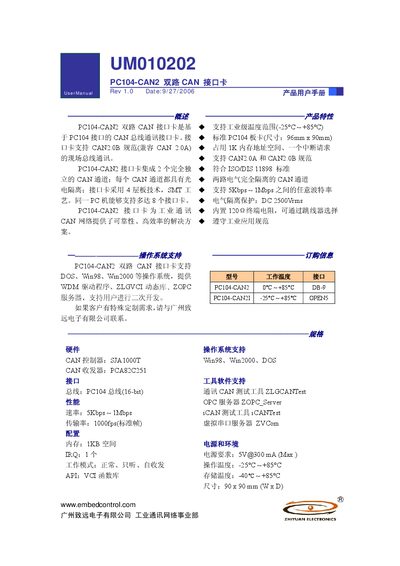
ZhiYuan Electronics PC104-CAN2 CAN Interface Card User Manual
This manual describes the PC104-CAN2 dual CAN interface card, a PC104‑form factor board that offers two fully isolated CAN 2.0B channels for industrial communication. It includes hardware specifications, supported operating systems, and driver information.
The document covers hardware installation, connector wiring, address configuration, driver installation, API usage, and maintenance procedures, along with appendices for CAN protocol frames and standard baud rates. This manual is written in Chinese.
ZLG PC104-CAN specifications
| Interface Type | PC/104 Slot |
|---|---|
| CAN Controller | PHILIPS SJA1000 |
| CAN Transceiver | PHILIPS PCA82C250 |
| Max Data Rate | 1Mbit/s |
| Optical Isolation Voltage | 1000VDC |
| CAN Protocol | CAN 2.0B (Compatible with CAN 2.0A) |
| Physical Dimensions | 96mm x 90mm |
Source: ZLG PC104-CAN Single-Channel Non-Intelligent CAN Interface Card User Manual
All ZLG PC104-CAN documents by type
Day-to-day operation, settings and troubleshooting. Start here if the product is already set up.
Questions answered in these manuals
What operating systems are supported?
The card supports DOS, WIN98, and Win2000 operating systems.
From: ZLG PC104-CAN Single-Channel Non-Intelligent CAN Interface Card User Manual
What is the default hardware base address?
The default hardware linear physical base address is 0x000CF000.
From: ZLG PC104-CAN Single-Channel Non-Intelligent CAN Interface Card User Manual
Which operating systems are supported by the PC104-CAN2 card?
The card supports DOS, Windows 98 and Windows 2000.
From: ZhiYuan Electronics PC104-CAN2 CAN Interface Card User Manual
How many independent CAN channels does the PC104-CAN2 provide?
It provides two fully independent CAN channels, each with optical isolation.
From: ZhiYuan Electronics PC104-CAN2 CAN Interface Card User Manual