
Key facts
Start here
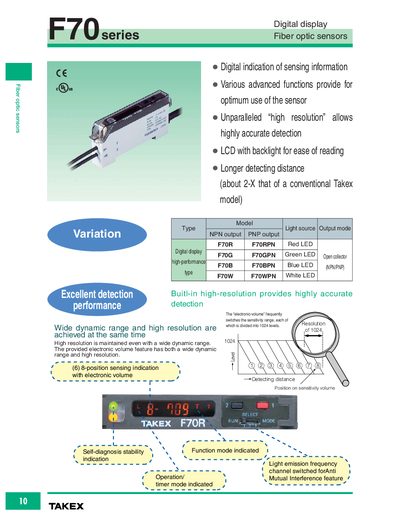
Takex F70 Series Digital Display Fiber Optic Sensor User Manual
The F70 Series digital display fiber optic sensors offer high‑resolution detection with an electronic‑volume feature that delivers a wide dynamic range while maintaining accuracy. The LCD with backlight and multiple LED light sources (red, green, blue, white) enable easy reading in various lighting conditions.
The manual describes multiple teaching modes (full auto, 2‑point, positioning, maximum sensitivity) and auto‑sensing functions that compensate for dust or water drops. Timer functions, hysteresis adjustment, and anti‑mutual‑interference features allow flexible integration into automation systems.
TAKEX F70 series specifications
| Sink current (NPN output) | 50 mA (30 VDC max.) |
|---|---|
| Source current (PNP output) | 50 mA (30 VDC max.) |
| Delay time (selectable) | 10‑120 ms (default 40 ms) |
| Light emission frequency channel 1 | 600 µs max |
| Operating temperature (1‑3 units) | 25‑55 °C |
| Storage temperature | -40 °C to 70 °C (non‑freezing) |
Source: Takex F70 Series Digital Display Fiber Optic Sensor User Manual
All TAKEX F70 series documents by type
Day-to-day operation, settings and troubleshooting. Start here if the product is already set up.
Questions answered in these manuals
How does the sensor’s detection distance compare to previous Takex models?
The F70 series provides a longer detecting distance, about twice that of a conventional Takex model.
From: Takex F70 Series Digital Display Fiber Optic Sensor User Manual
What is the procedure for full auto teaching of a moving object?
Press the teach button; the sensor automatically records the maximum and minimum data of the moving object and displays it after teaching is completed.
From: Takex F70 Series Digital Display Fiber Optic Sensor User Manual
What power supply does the F70 series amplifier use?
It uses 12–24VDC ± 10%.
From: TAKEX F70 Series Fibre Optic Amplifier Product Leaflet
What is the weight of the F70 amplifier?
It weighs approximately 80g including the mounting bracket.
From: TAKEX F70 Series Fibre Optic Amplifier Product Leaflet